
Three Commands, and the Question They Don’t Answer
Most of us learn Git like this:
git add .git commit -m "add feature"git pushAnd that’s usually enough. Until something goes wrong.
You reset a branch by accident. You find yourself on a detached HEAD and can’t work out where your commits went. You try to recover something and someone on Stack Overflow tells you to run git reflog, and it works, and you have no idea why it was even possible.
Or you ask the question underneath all of it:
What actually happens when I run
git commit?
Nobody teaches that. We learn the verbs and memorize the flags, and the mental model stays a fog that we route around. I’ve been using Git for years and I’d still be lying if I said I could explain the staging area without reaching for a metaphor.
I finally sat down and traced it. Once I did, branch, reset, checkout, merge, reflog, and even push stopped being separate things to memorize. They all became variations on the same three verbs: create objects, move references, transfer objects. The model is much smaller than the command surface suggests, and it’s worth the twenty minutes it takes to learn.
This is what I wish someone had shown me before the first time I deleted a day of work with git reset --hard origin/main.
The .git Directory
git init creates a directory with a handful of files:
.git/├── HEAD├── config├── index├── objects/├── refs/└── ...Four of those carry everything in this post:
objects/ the actual datarefs/ names that point at objectsHEAD what you're currently attached toindex the staging areaThe commands you use every day are a friendly interface layered over these pieces. git commit looks like one operation. Internally it’s four: hash the file, build a tree from the index, create a commit object, move a ref.
Porcelain and Plumbing
Git splits its own commands into two families. Porcelain is for humans — git add, commit, status, branch, merge, checkout. Plumbing is the lower-level layer underneath: git hash-object, cat-file, update-index, write-tree, commit-tree, update-ref.
You’ll rarely type the plumbing commands yourself. They’re useful for exactly one thing: they tell you what the porcelain version is actually doing.
Porcelain | | git commit v+-------------------+| Git plumbing || || create objects || create tree || create commit || update reference |+-------------------+The naming comes from an old Unix metaphor — plumbing is the pipes and valves that connect programs, porcelain is the friendly tool you hold. Git’s plumbing is deliberately dull, which is why git cat-file has kept working unchanged for over a decade while the porcelain has grown forty new flags.
I’ll come back to this in a few sections, because running the plumbing by hand is the fastest way to make any of this stick.
Git Is a Content-Addressable Store
This is the single most important idea in Git, and everything else follows from it.
Git doesn’t identify data by filename. It identifies data by content.
Store the bytes Hello World, and Git computes an ID for that exact byte sequence. Store those same bytes somewhere else and you get the same ID. Change one byte and you get a different one:
same content → same objectdifferent content → different objectThose objects live in .git/objects/, and the ID is the address. That’s what content-addressable means. A filename isn’t an identifier in Git — it’s data stored inside an object, sitting next to the hash.
The immediate payoff is deduplication. Two files with identical contents get one copy on disk and two pointers to it, which is the whole reason the a.txt / b.txt problem in the next section is even interesting.
The Four Object Types
Four types: blob, tree, commit, tag. The first three carry almost all the weight.
Blobs hold file contents
A blob is the content of a file, and nothing else:
blob | +---- "Hello World"Notice what’s missing: the filename. Write hello.txt to disk and:
echo "Hello World" | git hash-object -w --stdinGit prints an object ID. Ask what it is:
git cat-file -t <object-id> # → blobgit cat-file -p <object-id> # → Hello World-w is the flag that matters — without it Git computes the hash and throws it away instead of writing the object.
Why the blob doesn’t know its name
Consider two files:
a.txt → Hello Worldb.txt → Hello WorldIdentical contents. Storing two blobs would waste space, but it would also miss Git’s actual design, which is that names are structure, and structure is a different kind of thing.
blob ("Hello World") / \ a.txt b.txtThe names live in the tree.
Trees hold the directory structure
A tree represents a directory. Given:
project/├── README.md├── app.js└── src/ ├── db.js └── server.jsGit stores it like this:
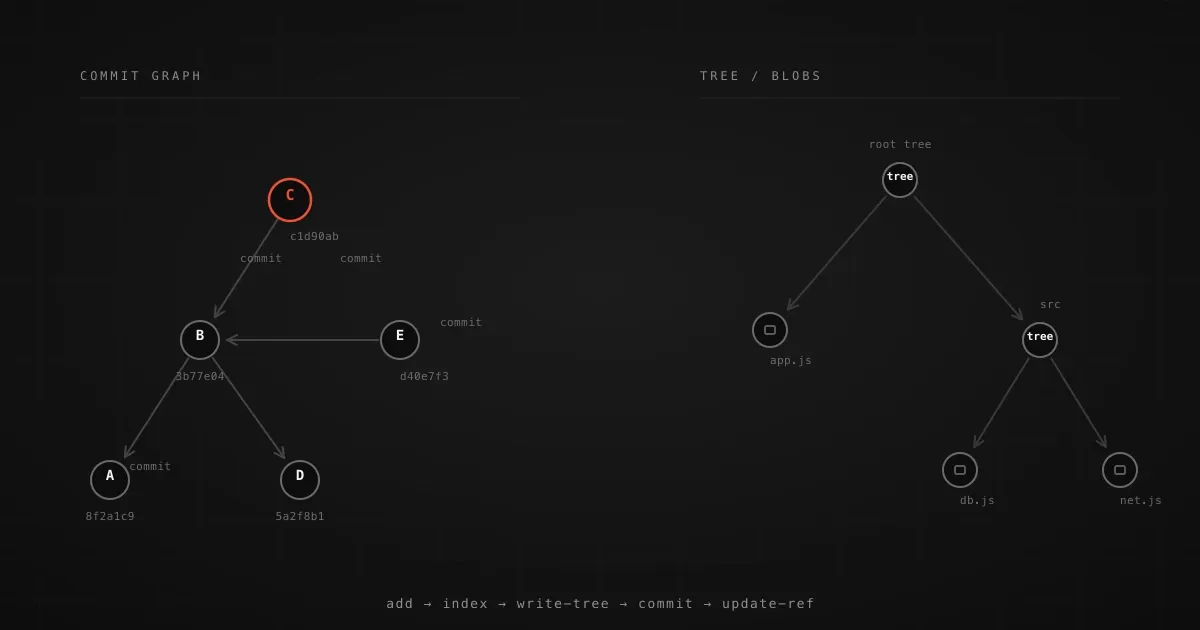
root tree / | \ / | \ README.md app.js src | | | blob blob tree / \ / \ db.js server.js | | blob blobEach entry carries a name, a mode (permissions, and whether it’s a tree or a symlink), and an object ID. Entries point at either a blob or another tree — nothing else. So:
BLOB = file contents
TREE = directory structure    = filenames    = permissions    = pointers to blobs and subtrees
There’s no object called src/db.js. There’s a root tree with an entry src pointing at a tree, which has an entry db.js pointing at a blob.
Note (Trees are sorted, and that's load-bearing)
Git sorts tree entries by name — and it sorts them roughly the way strcmp
would, with one quirk that trips people up: a directory’s name is internally
treated as if it ended in a /, so foo.txt sorts before the foo/
directory. This is why tree hashes are stable regardless of the order your
filesystem hands entries back. Object identity depends on determinism, and
determinism starts here.
Commits tie a tree to its parents
A commit points at a tree and records who, when, and why:
commit├── tree → the full snapshot├── parent → the previous commit (possibly several)├── author├── committer└── messageThe shape of history is encoded in those parent pointers: three commits A → B → C means C’s parent is B and B’s parent is A. The chain is the history — there’s no separate log file, and nothing else has to agree with it.
A commit is a snapshot, not a diff
Now the misconception that causes the most confusion later on. We imagine history as a series of patches:
Commit 1 → [diff] → Commit 2Git’s model is closer to this:
Commit 1 Commit 2 | | v v Tree 1 Tree 2 | | v v snapshot 1 snapshot 2A commit doesn’t say “I changed line 4 of app.js.” It says “here is the state of everything.” Diffs are something Git derives by comparing two trees, which is also why committing is fast: the expensive-looking operation is really just writing a tree and a commit object.
The old objects don’t get touched when you edit a file:
Commit 1 → Tree 1 → app.js → Blob A ("console.log('hello');")Commit 2 → Tree 2 → app.js → Blob B ("console.log('hello world');")Blob A has to stay byte-for-byte identical, because Commit 1 still depends on it. Change it retroactively and you’d have to rewrite every commit that points at it, which is exactly what a rebase does.
Warning (Snapshots, not diffs — but packfiles are deltas)
Don’t let the storage model bleed into the conceptual model. Git represents
objects as full snapshots, but it stores them using delta compression inside
packfiles. git cat-file on a blob hands you the whole content, while the
bytes on disk may be a dozen instructions against a neighbouring blob. The
object model stays snapshot-shaped; only the encoding is clever. Confusing the
two is what makes people insist Git stores diffs.
Put the pieces together and Git becomes what it actually is: a graph of objects, with commits as the top layer and nothing above them:
Commit C | +--------+--------+ | | parent tree | | v v Commit B Root Tree | +------------+-------------+ | | | server.js package.json src | | / \ blob blob db.js server.js | | blob blobTip (Walk your own repository)
Don’t take any of this on faith. git cat-file -p <commit> prints the raw
commit; git cat-file -p <tree-id> dumps the tree with every mode, type, hash,
and name; git log --graph --pretty=raw shows the parent pointers with
nothing elided. Run those on a repository you know cold — I’d pick something of
your own with a few hundred commits — and the abstractions dissolve.
The Index Is a Whole Thing
Now for the piece almost nobody thinks about: .git/index. It’s a real file, a real structure, and the reason the staging area works the way it does.
The index is Git’s description of what the next commit should contain. The working tree is what’s on your disk right now. The index is the proposal.
git add app.jsand you get this:
Working Directory Index├── app.js new └── app.js new├── db.js modified└── README.md modifiedThe useful part is that three versions of the same file can exist at once:
HEAD: version 1 (last commit)Index: version 2 (staged)Working Directory: version 3 (on disk)git add doesn’t create a commit. It moves a file from “current” to “proposed.” That one distinction is most of what people get wrong about the staging area — it’s not a queue of things about to be committed, it’s a draft of the next commit, sitting there being edited.
This explains the two diffs
git diff # working directory vs index — changed but not stagedgit diff --cached # index vs HEAD — what the commit would contain HEAD | | git diff --cached v INDEX | | git diff v Working DirectoryOnce the index exists as a real concept, the staging area stops being a metaphor.
What git add actually does
app.js | vhash the contents | vwrite the blob (if it doesn't exist) | vrecord path → blob in the indexgit ls-files --stage # show what's in the index right nowThe three steps inside a commit
1. Build a tree from the index.
git write-treeIt turns every path in the index into one tree object, recursively — app.js → blob, src → subtree, src/db.js → blob, and so on until the whole snapshot is covered.
2. Create the commit.
git commit-tree <tree-id> -m "Add database support"The object it writes looks like this:
tree <tree-id>parent <previous-commit-id>author Name <email> <timestamp>committer Name <email> <timestamp>
Add database support
3. Move the branch.
git update-ref refs/heads/main <new-commit> <old-commit>That <old-commit> argument is the part worth slowing down on. update-ref takes the value you expect the ref to currently hold, and refuses the write if it’s changed underneath you — a compare-and-swap on a file. Git’s own concurrency safety comes from this, and the “Updates were rejected because the remote contains work that you do not have locally” message you’d hit on a rejected git push is that same check failing on the remote.
Note (Same content, same hash, same commit)
Run those steps twice with the same message and you’ll get the same commit ID, provided the author, committer, and timestamp all match too. Commit IDs aren’t unique by construction, they’re unique by content — which is why a rebase rewrites every ID it touches. You genuinely have different objects, and there’s no way to pretend otherwise.
Do it by hand, once
echo "hello" > test.txt
# 1. write the blobgit hash-object -w test.txt# → 95a5f2b...
# 2. put it in the indexgit update-index --add --cacheinfo 100644,95a5f2b...,test.txt
# 3. build a tree from the indexgit write-tree# → 1b4f28e...
# 4. create a commit pointing at that treegit commit-tree 1b4f28e... -m "Initial commit"# → e3a1f0c...
You just made a commit without ever running git commit. Point a branch at it with git update-ref and nobody downstream can tell the difference — because there isn’t one.
Do this once, by hand, in a scratch repo. Twenty minutes. It’s the difference between “Git stores snapshots and I accept that” and actually being able to reason about what a commit is.
Branches Are Files Containing Hashes
A branch is a reference to a commit. It doesn’t contain the commits — it contains one hash.
Creating a branch is nearly free
git branch featureHEAD → main ──→ C │ │ └─────┴──→ C two names, one commitTwo names, one commit. No files copied, no repository duplicated — Git writes a loose ref containing the hash and a newline, a few dozen bytes in a file. This is why branching is cheap enough that a branch-per-feature workflow is obviously correct rather than merely tolerable.
cat .git/refs/heads/main# 8f2a1c3...That’s the implementation. If you have thousands of branches, Git consolidates the files into .git/packed-refs and deletes the loose ones, which is why reading refs through git show-ref or git for-each-ref is smarter than cat-ing paths.
Branches move
After a commit on feature:
main → Cfeature → D └─ parent → CThe commits are shared. Only the pointer moved.
HEAD: where you are
HEAD → main → CHEAD normally points at a branch, not at a commit. After git switch feature:
HEAD → feature → Dgit commit works without being told which branch to commit to because HEAD is the indirection that resolves the answer.
Detached HEAD
git checkout <commit>HEAD → C (no branch in between)HEAD points straight at a commit. Nothing named will move when you commit, so new commits form a chain that no ref points to:
HEAD → C → D → E ← reachable, but unnamedNothing is broken — the commits are real, they’re just unnamed, and unnamed objects are garbage-collectable. This usually happens to people by accident, most often during a git bisect or after checking out a raw SHA from a PR link. Then they commit, switch branches, and a day later realize their work is only in the reflog.
Warning (The reflog is a safety net, not a plan)
Those commits stay recoverable for a while, and git reflog will show you
where. But don’t build a habit on that. If you suspect you might commit while
detached, create a branch first — git switch -c rescued at the detached
commit costs nothing and makes the work permanent. I’ve seen people lose
commits to gc because they trusted the reflog, and the reflog is not a
substitute for a named branch.
History is a DAG, not a list
D /A → B → C \ EA merge is a commit with two parents:
D ─────┐ / │A → B M \ │ E ─────┘Which is why Git is a directed acyclic graph and not a list — and why “rebase to get a clean history” is a matter of rewriting the graph into the shape you wanted, not of reformatting anything.
Refs on Disk, and Where Your Remotes Live
.git/refs/├── heads/│ ├── main│ └── feature└── remotes/ └── origin/ └── mainrefs/heads/main is your local main. refs/remotes/origin/main is your local record of where the remote’s main was the last time you fetched.
origin/main is not your branch
Remote:    A → B → C          main
Local:     A → B → C          origin/main                \                 D            main
After that local commit, main is ahead of origin/main. When git status tells you that, it’s measuring the distance between two local refs — one of which is a cached copy of someone else’s state, and that cache only refreshes when you fetch or push. I’ve had more pushes rejected by a stale remote-tracking ref than by any actual conflict.
Push Transfers Objects and Updates Refs
Local                              Remote
origin/main → Cmain → Dgit push origin mainFour things happen, in this order:
1. Negotiate which objects the remote is missing2. Pack and send exactly those objects3. Update refs/heads/main on the remote4. Update refs/remotes/origin/main locallyLocal Remote
D (commit)├── tree└── blob ──── pack & send ───▶ stored as objects │ └──── update ref ─────────▶ refs/heads/main → DGit doesn’t “send files.” It sends the objects the other side doesn’t have, then moves a ref — which is why cloning a huge repository doesn’t mean transferring every byte of every commit.
Step 1 is the interesting one. The remote says “I have everything reachable from these refs,” the client says “mine reaches these,” and the difference falls out of the intersection. If you already share history, almost nothing moves. Step 3 is the compare-and-swap from earlier: if the remote’s main isn’t where your fetch said it was, the push is rejected rather than clobbering whatever landed in between. The fix is almost always a git pull --rebase, not a --force, because --force is how you delete someone else’s afternoon.
Packfiles, Garbage Collection, and Unreachable Objects
If every blob, tree, and commit were a loose file, .git would be unusable. A single mid-sized commit can create thousands of objects, and a file per object is a filesystem catastrophe.
Git’s answer is packfiles — many objects in one file, with similar ones stored as deltas:
Version 1: AAAAAAAAAAAAAAAAAAAAVersion 2: AAAAAAAAAAAAAAAAAAAABStoring both in full wastes almost all of the second. Storing a reference to version 1 plus “same, but one byte changed at the end” costs a handful of bytes. Git picks delta bases by similarity in the content and the path, not by history, which is why two unrelated files with similar structure still compress well. They’re bundled in .git/objects/pack/ as a .pack of the objects and a .idx of their offsets, and git count-objects -vH will tell you how many loose ones you’ve got lying around.
Note (Look at the storage layer yourself)
git gc (which usually runs on its own schedule) packs loose objects, prunes
anything unreachable, and expires old reflog entries. git verify-pack -v .git/objects/pack/*.idx lists every object in a pack with its type, its
on-disk size, and how much each delta actually saved. It’s the clearest window
into the gap between the object model and the bytes on disk.
Unreachable ≠ deleted
main → C → B → AMove main back:
git reset --hard Bmain → B → A
C ← still on disk, nothing points to itC isn’t gone. It’s just unreachable, and it’s only actually deleted when something like git gc --prune=now decides it’s safe — which is a time-bounded judgement, because the reflog still references it.
That gap between unreachable and deleted is the whole reason deleted commits are recoverable at all. It is also the reason the recovery window is measured in weeks rather than days, which brings us to the thing that has saved me more than once.
The Reflog
git reflogabc123 HEAD@{0}: reset: moving to HEAD~1def456 HEAD@{1}: commit: Add authenticationThe reflog is an append-only log of where each ref has pointed, kept in .git/logs/. That commit C is still in there:
git reset --hard def456Two things about the reflog, and the second matters more. First, it’s local — pushing doesn’t send yours, so it’s no substitute for a branch you actually pushed. Second, entries expire: git gc prunes reachable entries after 90 days and unreachable ones after 30, configurable via gc.reflogExpire and gc.reflogExpireUnreachable. That 30 days is the real deadline for anything the reflog is holding onto, and it’s the number I check first when someone tells me they’ve lost work.
The Whole Thing, End to End
You edit src/db.js. Here is everything that happens.
src/db.js on disk | | git add v hash the bytes | v BLOB ────── written to .git/objects/ | v INDEX ───── path → blob recorded | | git commit v write-tree | v TREE ────── snapshots every path | v commit-tree | v COMMIT ───── tree + parents + message | v update-ref | v refs/heads/main ^ | HEADgit push then does the same thing across a network: negotiate the missing objects, pack and send them, update the remote’s ref, and update your origin/main.
I traced this once with GIT_TRACE=1 and found there’s nothing under it — four object writes, one ref update, and an atomic write of the lockfile. The reason this took me years to notice is that none of it is exposed, which is exactly what a good abstraction does and exactly what makes it hard to learn from the outside.
The Model to Keep
HEAD | v branch | v COMMIT / \ / \ parent TREE | | v +---- file → BLOB COMMIT | +---- folder → TREE | +---- file → BLOBEight definitions. A blob is file contents; a tree is directory structure plus names; a commit is a snapshot with metadata and parents; a branch is a pointer to a commit; HEAD is what you’re currently attached to; the index is what will go into the next commit; objects are the data; refs are the names.
The payoff isn’t the vocabulary. It’s that you can now derive a command instead of recalling it. git add hashes a file, writes a blob, updates the index. git commit builds a tree, creates a commit, moves a ref — and if it also needs to update a branch to point at an older commit, the name of that operation is reset. git merge is the one that creates a commit with two parents. git reflog is the log of where refs have been. git push transfers objects and updates a ref somewhere else.
Nine verbs, one data model, and every weird flag in the manual is a shortcut for one of them. That’s a much better deal than the two hundred commands I spent years memorizing the hard way.