
The Query That Used to Be Instant
Every app has a moment like this. Somebody writes:
SELECT * FROM orders WHERE customer_id = 48213;It’s instant in dev, instant in staging, instant for the first few months in prod. Then the orders table crosses a few million rows, and one day that same query takes 800ms at 2 AM because someone added a status filter on the checkout flow and nobody indexed it. Nobody changed the original query. The table just grew, and the database’s only option — scan every row, check if it matches — grew with it.
That’s the whole problem in one sentence: without help, the database has no way to know where a row is without looking at all of them.
An index is that help. It’s a separate structure, stored alongside the table, that tells the database “rows where customer_id = 48213 live here” instead of “somewhere in these 4 million rows, go look.” Everything else in this post is really just an explanation of how that structure is built and what it costs you to keep it around.
Part 1: What a Full Table Scan Actually Costs
Picture the orders table as a stack of pages on disk. With no index, WHERE customer_id = 48213 means:
Page 1 → does any row here have customer_id 48213?Page 2 → does any row here have customer_id 48213?Page 3 → does any row here have customer_id 48213?...Page N → does any row here have customer_id 48213?There’s no shortcut. The database has to touch every page, because nothing on disk tells it otherwise. In complexity terms this is O(n) — double the rows, double the work, forever.
Note
This is fine, on purpose, for small tables. Reading 500 rows sequentially is often faster than the overhead of consulting an index and then jumping back to fetch the row. Indexes start paying for themselves once scanning stops being cheap — not before.
The fix isn’t “read faster.” It’s “don’t read what you don’t need to.” That’s what an index gives you.
Part 2: The B-Tree, Which Is Doing Almost All the Work
Open up nearly any relational database — Postgres, MySQL, SQL Server — and the default index type underneath CREATE INDEX is some flavor of B+Tree. It’s worth actually understanding this structure, because most of what feels like index “magic” later is just consequences of this shape.
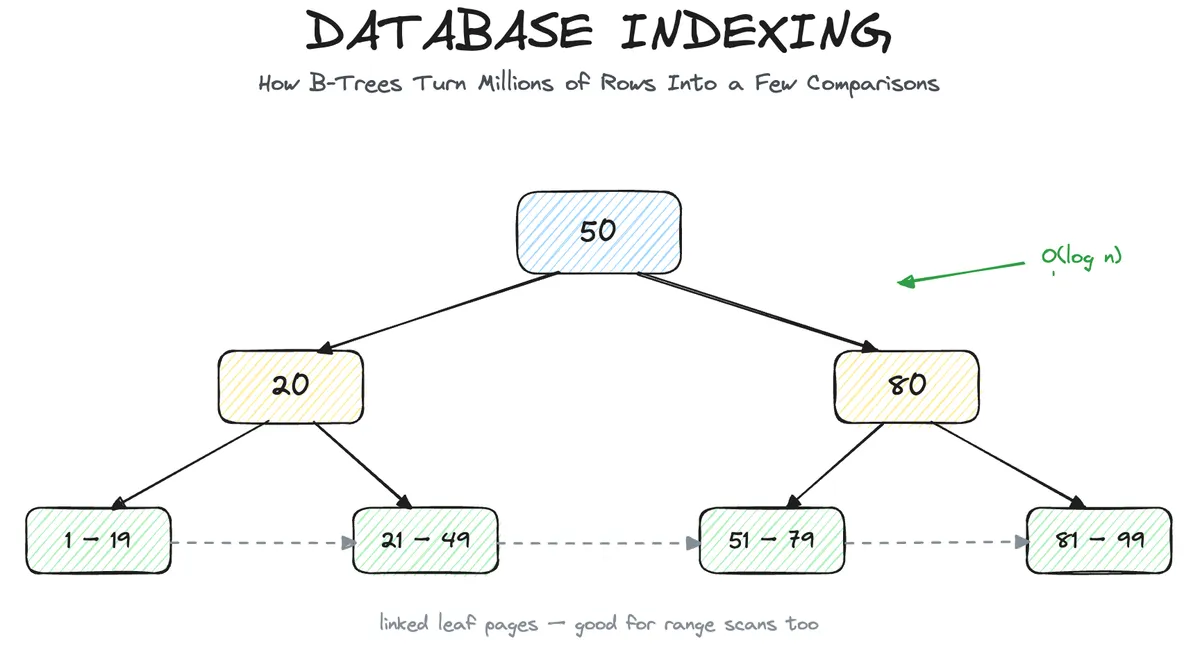
A B+Tree keeps keys sorted, and organizes them so you can binary-search your way down instead of scanning linearly:
[ 50 ] / \ [ 20 ] [ 80 ] / \ / \ [1..19] [21..49] [51..79] [81..99]Looking for customer_id = 48213? The engine doesn’t touch every leaf — it compares against the root, goes left or right, compares again, and keeps narrowing until it lands on the one leaf page that could possibly contain the value. That’s O(log n): a table 100x bigger costs the tree maybe 2-3 more comparisons, not 100x more work.
The leaves themselves are linked to each other in order:
[1..19] → [21..49] → [51..79] → [81..99]That linking is why B-Trees are good at more than exact matches. WHERE age > 30 doesn’t need a fresh search per row — the engine finds where 30 starts and just walks the leaf chain forward. Range queries, ORDER BY, BETWEEN — all of that rides on the same sorted, linked structure.
Note
This is also exactly why a B-Tree can’t help LIKE '%foo%'. A wildcard with nothing anchored at the start means there’s no sorted position to binary-search toward — the value could start anywhere. Sorted structures only help when you know what you’re sorting by.
Part 3: Clustered vs Non-Clustered
Most people hand-wave this part. Let’s not.
A clustered index determines the physical order rows are stored in on disk. There can only be one, because a table can only be arranged in one physical order at a time. In MySQL’s InnoDB, the primary key is the clustered index by default — the table’s row data lives inside the leaves of that B-Tree.
A non-clustered (secondary) index is a separate structure entirely. Its leaves don’t hold the row — they hold a pointer back to where the row actually lives:
Clustered index (InnoDB, PK = id)┌─────────────────────────────┐│ leaf: id=1 → [full row data]││ leaf: id=2 → [full row data]││ leaf: id=3 → [full row data]│└─────────────────────────────┘
Non-clustered index (on email)┌───────────────────────────────┐│ leaf: 'a@x.com' → pointer to id=3 ││ leaf: 'b@x.com' → pointer to id=1 │└───────────────────────────────┘
Query on email, and the engine does two hops: find the leaf in the email index, follow the pointer, then go fetch the actual row from the clustered index. That second hop is called a lookup, and it’s the reason a query that “uses an index” can still be slower than you’d expect if it has to do a lookup for every single matching row.
This is also why choosing a primary key matters more than it looks like it should. A monotonically increasing PK (auto-increment IDs) means new rows always get appended to the end of the clustered structure. A random PK — a UUID, say — means new rows land in arbitrary places across the tree, fragmenting pages and pushing existing data around. Same index type, meaningfully different write behavior.
Part 4: Composite Indexes and the Rule Nobody Reads the Docs For
An index doesn’t have to be one column. CREATE INDEX ON orders (customer_id, created_at) builds one structure sorted first by customer_id, and within each customer_id, sorted by created_at:
customer_id | created_at------------|------------ 101 | 2024-01-02 101 | 2024-03-11 101 | 2024-06-04 204 | 2024-01-19 204 | 2024-02-27That ordering is not symmetric, and this is the part that trips people up: this index helps
WHERE customer_id = 204WHERE customer_id = 204 AND created_at > '2024-01-01'but does nothing for
WHERE created_at > '2024-01-01'on its own. That’s the leftmost-prefix rule — the index is only searchable from its first column inward, the same way you can’t binary-search a phone book by first name when it’s sorted by last name. If you find yourself needing to filter by created_at alone and by both columns together, you need two indexes, or the composite one reordered — not a workaround.
Part 5: Covering Indexes — Skipping the Table Entirely
Go back to the two-hop lookup from Part 3. What if the index itself already contains every column the query needs? Then there’s no second hop — the engine answers the whole query from the index alone. This is a covering index, and it shows up in EXPLAIN output as an index-only scan.
CREATE INDEX ON orders (customer_id) INCLUDE (status, total);
SELECT status, total FROM orders WHERE customer_id = 48213;Here, status and total ride along in the index’s leaves. The engine finds the matching leaf and is already holding everything the SELECT asked for — it never has to touch the underlying table at all. On a hot, narrow query this can be the difference between one page read and two.
Part 6: Partial and Expression Indexes — Closing the Loophole
Most people don’t know these exist until they’ve already written the workaround in application code.
Partial indexes cover only the rows matching a condition, not the whole table. Say orders has millions of rows but 95% of them are status = 'completed' and never queried again — only the pending ones get hit constantly:
CREATE INDEX orders_pending_idxON orders (customer_id)WHERE status = 'pending';That index is a fraction of the size of a full one, because it only ever contains rows where the condition holds. Smaller index means faster writes to maintain it, less disk, and a structure the planner can actually keep hot in memory. The trade-off is narrow but real: it only helps queries that filter by status = 'pending' too — ask for status = 'completed' and this index doesn’t exist as far as the planner’s concerned.
Expression (functional) indexes solve the other loophole — the one from Part 4’s LOWER(email) example. A plain index on email is built on the raw column values, so a query that wraps the column in a function has nothing to match against. The fix is to index the expression itself:
CREATE INDEX orders_email_lower_idx ON users (LOWER(email));
SELECT * FROM users WHERE LOWER(email) = 'foo@example.com';Now the index isn’t sorted by email — it’s sorted by LOWER(email), which is exactly what the query is filtering on. Same idea works for date_trunc('day', created_at), first_name || ' ' || last_name, or any deterministic expression you find yourself repeating in WHERE clauses. The rule underneath both of these is the same one from Part 3: the index only matches what it was actually built to describe. A B-Tree on email describes email, not a function of it.
Part 7: Reading What the Database Actually Decided to Do
None of the above matters if you don’t check whether the planner is using it. EXPLAIN ANALYZE is the tool for that, and the difference is unambiguous once you’ve seen it once.
Without an index:
Seq Scan on orders (cost=0.00..84213.00 rows=1 width=64) Filter: (customer_id = 48213) Rows Removed by Filter: 3999999With one:
Index Scan using orders_customer_id_idx on orders (cost=0.43..8.45 rows=1 width=64) Index Cond: (customer_id = 48213)Seq Scan means every row got checked and almost all of them got thrown away. Index Scan means the planner jumped straight to the candidates. If you add an index and the plan still says Seq Scan, the index isn’t the problem — something else is: the column has a function wrapped around it (WHERE LOWER(email) = ... won’t use a plain index on email), the table is small enough that the planner correctly prefers a scan, or the statistics are stale and the planner’s estimate of row counts is wrong.
Note
Adding an index is not a guarantee it gets used. The planner picks based on cost estimates, not on what indexes exist. Checking EXPLAIN after adding one isn’t optional — it’s the only way to know it actually did anything.
Part 8: The Write-Side Cost Nobody Counts
Indexes are not free reads bought with free storage. Every index you create has to be updated on every INSERT, UPDATE, and DELETE that touches its columns. A table with six indexes doesn’t do one write per insert — it does one write to the table plus one write to each of the six index structures.
INSERT INTO orders (...) │ ▼ write row to table │ ├──▶ update index 1 ├──▶ update index 2 ├──▶ update index 3 ├──▶ update index 4 └──▶ update index 5, 6...That’s real cost, and it compounds: more indexes means slower writes, more disk usage, and more work for the planner to consider when choosing a plan. It’s also why indexing every column “just in case” is a bad default — the ones that never back a query are pure downside.
A few things narrow this down fast:
- Index what you filter, join, or sort by — not what you occasionally
SELECT. - Booleans and three-value status columns rarely justify their own index — the selectivity isn’t there, and half the table matching a value defeats the whole point.
- Write-heavy tables deserve fewer, more deliberate indexes than read-heavy ones. Composite indexes can often replace two or three single-column ones if you get the column order right, cutting write overhead without giving up query speed.
Part 9: Indexes Aren’t a One-Time Decision
Everything so far treats an index like something you create once and forget about. In practice, a B-Tree that’s absorbed a few million updates and deletes doesn’t look like the clean diagram from Part 2 anymore — it accumulates damage, and the damage has a name: bloat.
Here’s the mechanic. Postgres, for instance, doesn’t overwrite a row in place on UPDATE — it writes a new version and marks the old one dead. Every index pointing at that row now has a leaf entry pointing at a dead tuple:
UPDATE orders SET status = 'shipped' WHERE id = 42; │ ▼ old row (id=42, status=pending) → marked dead new row (id=42, status=shipped) → written fresh │ ▼ every index on this table now has one stale entry pointing at the dead version, until cleanup runsDELETE does the same thing — the row’s gone logically, but its space and its index entries aren’t reclaimed instantly. Left alone, a heavily-written table’s indexes fill up with dead weight: leaf pages that are mostly holes, which means more pages to read for the same number of live rows, which quietly erodes the exact speedup you built the index for.
This is what VACUUM (Postgres) or OPTIMIZE TABLE (MySQL) exist to fix — they reclaim dead space and let index pages get reused instead of endlessly growing. REINDEX goes further and rebuilds the structure from scratch, which matters after a period of heavy churn or a bulk delete leaves a tree lopsided even after routine cleanup.
Note
This is also why “add the index and move on” isn’t quite the full story. An index on a write-heavy table needs the same kind of ongoing attention as the table itself — most managed databases run this automatically in the background, but it’s worth knowing it’s happening, and worth checking index bloat directly if a query that used to be fast slowly drifts back toward slow with no code change behind it.
Part 10: Tracing the Full Path
Put it together end to end. Table orders, index on (customer_id, created_at), query:
SELECT status FROM ordersWHERE customer_id = 48213 AND created_at > '2024-06-01';1. Planner checks available indexes → sees (customer_id, created_at), leftmost prefix matches2. B-Tree descent → root → internal node → leaf, narrowing by customer_id3. Leaf chain walk → within customer_id=48213, walk forward past created_at > 2024-06-014. Lookup (non-covering index) → follow pointer back to actual row for `status`5. EXPLAIN confirms → Index Scan, not Seq ScanEvery part of this post is really an answer to one of those five steps: Part 2 is step 2, Part 4 is step 1 and 3, Part 5 is what removes step 4, Part 6 is how you check step 5, and Part 7 is what you’re paying for all of it on the write side.
The Ceiling — What Indexing Won’t Fix
It’s worth saying plainly: indexes fix “the database is scanning more than it needs to.” They don’t fix a bad schema, a query pulling ten times more data than the page actually renders, or an N+1 query pattern making a thousand fast lookups instead of one efficient join. Indexing a poorly designed query just makes the poorly designed query fast — the design problem is still there, quietly waiting for the next scale threshold.
| Symptom | Indexing helps | Indexing doesn’t help |
|---|---|---|
Slow WHERE on a large table | Yes | — |
Slow ORDER BY / range scan | Yes | — |
Slow LIKE '%x%' | No | Needs trigram / full-text index instead |
| Slow writes from too many indexes | — | You need fewer indexes, not more |
| N+1 queries from an ORM | No | Needs query restructuring |
| Wrong data model for the access pattern | No | Needs a schema change |
Get the access pattern right first. Indexing is what makes a correct query fast — it’s not a substitute for writing one.