
The Pattern Everyone Ships
There’s a moment in nearly every React app’s life where a component needs data from a server, and the first instinct is always the same:
useEffect(() => { setLoading(true) fetch('/api/things') .then((res) => res.json()) .then((data) => setData(data)) .finally(() => setLoading(false))}, [])It works, and that’s honestly the most dangerous thing about it. Data appears, you move on, and the bill shows up later.
Then the app grows, and you slowly notice what you’ve signed up for. Somewhere along the way you end up hand-writing:
- Deduplication — two components rendering the same page section fire two identical requests, because nothing knows the other one exists.
- Caching — the user navigates away and comes back, and you refetch from scratch. Blank spinner and all.
- Race conditions — a slow first request resolves after a fast second one and clobbers it with stale data.
- Retries — a flaky network blip kills the request and nobody even knows.
- Background refresh — you can’t say “show what I have, but quietly go check if it’s still right.”
- Cache invalidation — after a mutation, every place that shows this resource has to somehow find out.
None of this is really about fetching. It’s about state management for data that lives on a server — which means you’ve been quietly rebuilding a cache by hand in every component, badly, with useState.
Note
The deeper problem isn’t the fetch — it’s the cache. A useEffect + fetch + useState block is data fetching the way ILIKE '%x%' is search: fine at the start, and then it quietly stops scaling as an approach even though each individual request is still cheap.
The useful question is never “how do I call this API?” It’s “who owns the data once it arrives — and how does everyone find out when it changes?”
Part 1: Server State Is Not Client State
Client state — a modal being open, a form’s current input, which tab is active — is state your app owns outright. It only changes when you change it, and it lives in your tree.
Server state breaks the useState model in three ways:
- You don’t own it. Someone else’s database can change it without telling you.
- It’s async by nature. Every read is a round trip; there’s no instant “value.”
- It can go stale the moment you query it. Freshness decays continuously, not all at once.
That last one is the one people skip. A client-state variable is true until you set it false. Server data is correct for a while, and then it’s merely what you last saw. Any model that treats it like a boolean in memory is missing the point.
So what does a library do with this kind of state? It doesn’t manage your components. It manages your data, and your components subscribe:
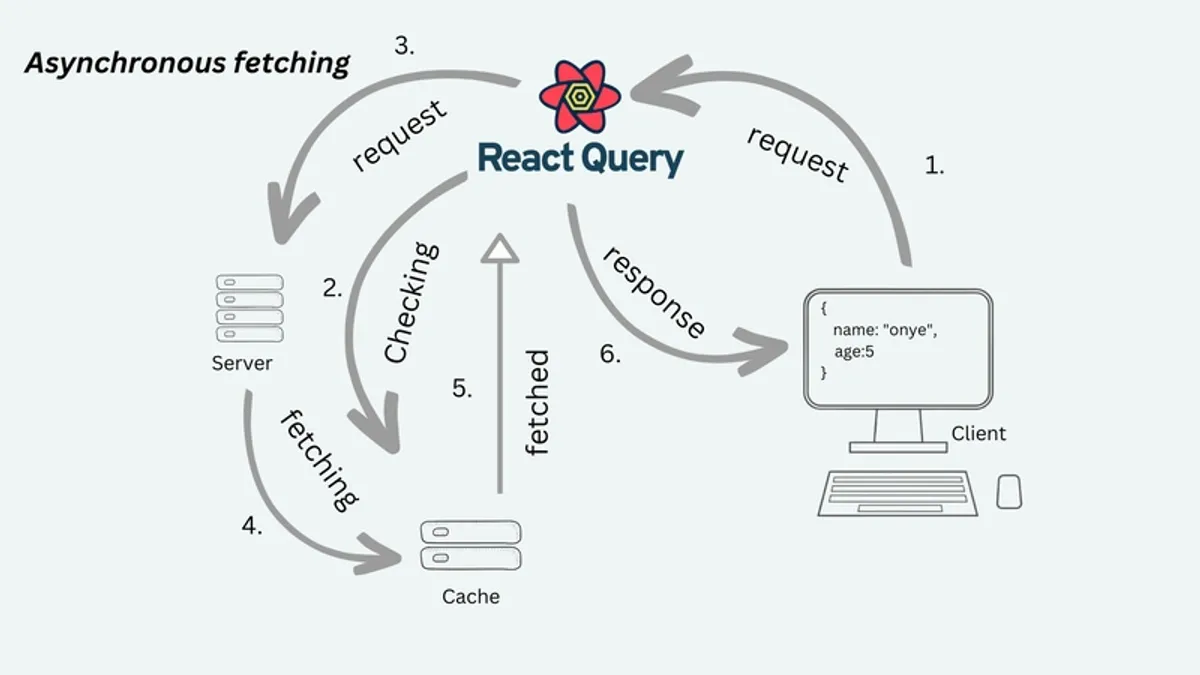
┌────────────────────────────────────────────┐│ QueryClient (the cache) ││ ││ key → { data, status, fetchStatus, ││ dataUpdatedAt, retries, ... } │└──────────────┬──────────────▲─────────────┘ │ subscribes │ writes useQuery useMutation │ │ ┌─────┴─────┐ ┌─────┴─────┐ │ Component │ │ Component │ └───────────┘ └───────────┘A QueryClient sits above your component tree and holds an in-memory map from query keys to cache entries. useQuery subscribes to one entry. useMutation is how you write back to the server and, indirectly, tell the cache it needs to catch up.
The habit worth stealing from the whole model: stop thinking “I need to fetch X on mount” and start thinking “I need to declare that this component depends on X, at this freshness.” The library decides what that means — cached data, a network request, or both.
Part 2: queryKey — The Address of Your Data
useQuery({ queryKey: ['projects', { status: 'active' }], queryFn: fetchProjects,})The queryKey is the cache address. Two components in totally different corners of the tree using the identical key share one slot and dedupe into a single request.
This is why parameterized keys are the standard pattern:
['project', projectId]['projects', { status }]['stats', period]Change any part of the key — a filter, a page number, an ID — and you get a different slot, not a polluted one. Nothing mutates when you write ['stats', 'week'] instead of ['stats', 'month']; you’re just pointing at a different (possibly empty, possibly already warm) drawer.
That one property buys you filter switching, pagination, and per-entity caching with zero extra code. And because the key is the whole identity, deduplication is free: call useCurrentUser() from a dozen places and you hit the API once per cache window, not once per call site. Before a shared cache this is usually solved — if it’s solved — with ad hoc singleton fetchers or context providers built purely to avoid duplicate requests.
Part 3: queryFn — You Say How, the Library Says When
queryFn: () => fetchProjects({ status: 'active' })You write the “how do I get this” function; the library owns the “when.” That when is: on mount, if there’s no fresh cached data; when the query key changes; on an interval you configure; on window refocus if you’ve enabled it; or after an explicit invalidation.
You never call queryFn yourself. That inversion — you declare the dependency, the library handles the timing — is what deletes most of the manual useEffect fetching from a real app. The component stops being a fetch driver and becomes a subscriber.
Part 4: status vs fetchStatus — the One People Get Wrong
This is the most misunderstood piece of the library, and it’s the source of most “my spinner never goes away” bugs. TanStack Query tracks two independent states:
status = 'pending' | 'success' | 'error' → do we HAVE data?fetchStatus = 'fetching' | 'idle' | 'paused' → are we GETTING data right now?They combine like this:
| status | fetchStatus | meaning |
|---|---|---|
| pending | fetching | first load, in flight |
| pending | idle | query hasn’t run — e.g. enabled: false |
| success | idle | data cached, nothing happening |
| success | fetching | background refetch, old data still shown |
| error | idle | failed, and not currently retrying |
The derived flags follow directly:
isPending = status === 'pending'isFetching = fetchStatus === 'fetching'isLoading = isPending && isFetchingThe trap shows up the moment a query is disabled. A disabled query (enabled: false) that has never run still has status: 'pending'. So isPending is true even though nothing is fetching and nothing ever will until it’s enabled. Check isPending there and you’ll render a spinner that never resolves — because nothing is in flight to resolve it.
The fix is mechanical once you see it: use isLoading (pending and actively fetching) for a full-screen spinner, and reserve isPending for queries that are never disabled and genuinely haven’t loaded yet. The phrasing that finally clicked for me: pending means I don’t have data; fetching means I’m doing something about it right now.
Part 5: staleTime and gcTime — Freshness vs Keeping Around
staleTime: 60_000 // this data is "fresh" for 60 secondsstaleTime is the option with the most leverage in the library, and the one most often left at its default of zero without much thought. It answers one question: for how long after a fetch is this data still good enough to show without checking again?
- Within
staleTime: mounting a component that uses this key shows cached data instantly — zero network calls. - After
staleTime: the data is stale. It’s still shown immediately — this is the important part — but the next mount, refocus, or interval tick triggers a silent background refetch.
Stale does not mean “don’t show it.” Stale means “show it now, and quietly go check if it’s still correct.” That’s stale-while-revalidate, and it’s why apps on TanStack Query rarely flash a blank loading state on a page you’ve already visited. They show whatever’s cached and reconcile in the background.
The per-query judgment call:
- Something the user just toggled: seconds.
- A list that changes with normal usage: tens of seconds to a couple of minutes.
- A media library or profile that barely moves: several minutes.
There’s no universal right number. The point is that it’s configurable per query, which hand-rolled fetch logic almost never bothers to be.
gcTime — the Actual Expiry
Where staleTime controls freshness, gcTime (garbage collection time, default 5 minutes) controls how long unused data stays in memory at all — specifically, how long after the last subscribed component unmounts before the cache entry is dropped.
Navigation is where you feel the difference. Leave a page and come back within gcTime, and the whole entry is still there: instant render, no network, and staleness timers resume exactly where they left off. Stay away longer and the slot is evicted; the next visit is a clean fetch.
They answer two different questions and are easy to conflate:
staleTime: "is this still correct?"gcTime: "is this still worth keeping around?"The conflation is a classic production bug. Someone’s page “refetches too much,” so they crank gcTime up — but the thing was never about memory. It was staleTime doing its job.
Note
Think of it like a news app’s article view. staleTime decides if the headline you’re reading is close enough to the truth that we can skip rechecking. gcTime decides how many articles we keep cached after you swipe back to the feed, in case you tap through again. One is about trusting, the other is about tidying.
Part 6: Mutations and Invalidation — Telling the Cache the World Changed
Mutations change server state. The cache has no way to know that on its own; you have to say so.
queryClient.invalidateQueries({ queryKey: ['projects'] })invalidateQueries marks every entry whose key starts with the given key as stale, and refetches any of them with a live subscriber right now. If nothing is watching that entry, it just gets marked stale and refetches the next time something mounts it.
Prefix matching is what makes this scale:
['projects']                    // the list['project', id]                 // one detail view
invalidateQueries({ key: ['projects'] })   // matches ONLY the listinvalidateQueries({ key: ['project'] })    // matches every ['project', id] slot
One call after a mutation can refresh a list, every open detail view, and any derived query sharing the prefix — without your mutation code knowing which components happen to be on screen.
Writing to the Cache Instead of Refetching
If a mutation’s response already is the fresh data, refetching it is a wasted round trip:
queryClient.setQueryData(['project', result.id], result)setQueryData writes straight into the cache, and every subscriber re-renders immediately — no network call at all. The common pattern: setQueryData the entity you just got a fresh copy of, and invalidateQueries the list it belongs to, since you don’t hold the whole updated list yet.
Removing Stale Entries Entirely
After a delete, you don’t want a refetch — you want the entry gone:
queryClient.removeQueries({ queryKey: ['project', id] })Leave it and revisiting that ID could briefly render deleted data before a refetch corrects it. Removing it guarantees the next visit starts clean.
The mutation itself is the imperative counterpart:
const mutation = useMutation({ mutationFn: updateProject, onMutate: (variables) => { /* before the request fires */ }, onSuccess: (data, variables) => { /* request resolved */ }, onError: (error, variables, context) => { /* request rejected */ }, onSettled: () => { /* always runs, success or failure */ },})Unlike queries, mutations have no cache of their own. Their callbacks exist exactly to reconcile whatever they changed with the query cache — using setQueryData and invalidateQueries above.
The simplest pattern is non-optimistic: disable the trigger, show a spinner, wait for onSuccess or onError. That’s the right call whenever the user genuinely needs confirmation the write landed — a publish action, a payment, anything where “it looked like it worked” isn’t good enough.
Part 7: Optimistic Updates — Where It Stops Being “Nicer Fetch”
This is the pattern where TanStack Query stops feeling like a fetch library and starts feeling like a magic trick. A toggle, a like button, a status flip — anything where the user expects to see the change immediately, not after a round trip — is a candidate.
const toggleMutation = useMutation({ mutationFn: ({ id, next }) => setStatus(id, next),
// ① stop any in-flight refetch before we write onMutate: async ({ id, next }) => { await queryClient.cancelQueries({ queryKey: ['items'] })
// ② snapshot — this is the rollback point const previous = queryClient.getQueryData(['items'])
// ③ write the change into the cache NOW, before the server replies queryClient.setQueryData(['items'], (old) => old?.map((item) => (item.id === id ? { ...item, status: next } : item)), )
return { previous } },
// ④ restore the snapshot if the server rejects onError: (_err, _vars, context) => { if (context?.previous) { queryClient.setQueryData(['items'], context.previous) } },
// ⑤ reconcile with server truth no matter what onSettled: () => { queryClient.invalidateQueries({ queryKey: ['items'] }) },})The steps are ordered for a reason:
- ① Cancel in-flight queries first. If a background refetch is already running when the mutation fires, it can resolve after your optimistic write and silently overwrite it with old data. Cancelling makes your optimistic write the last word until the mutation settles.
- ② Snapshot before mutating.
getQueryDatareads the cache synchronously. This is your undo point, grabbed at the exact moment before you touch anything. - ③ Write immediately.
setQueryDataaccepts an updater function just likesetState, and every subscriber re-renders on the same frame. This is the entire trick behind “no spinner on toggle” UIs. - ④ Roll back on failure. Restore the snapshot and the UI corrects itself as if nothing happened — no manual undo logic required.
- ⑤ Always reconcile on settle. An optimistic write is a confident guess, not the truth. Invalidating on settle — success or failure — makes the cache converge back to what the server actually has.
Note
The perceived latency of a write drops to zero; only the correction, if there is one, becomes visible. That’s the whole sales pitch in one sentence — the network got no faster, but the interface feels instant.
This is also why the snapshot is so important. If you skip step ②, you have no way to restore state, and the only fix for a failed write is waiting for the invalidation to round-trip. It’ll converge eventually, but you’ll leave a wrong UI on screen for a full request duration. Always snapshot. Cheap insurance.
Part 8: Infinite, Parallel, and Lazy Queries
Infinite queries — pagination without hand-rolled page state
useQuery gives you one page of data per key. The moment you need “load more,” you reach for a different hook:
const { data, fetchNextPage, hasNextPage, isFetchingNextPage } = useInfiniteQuery({ queryKey: ['projects'], queryFn: ({ pageParam }) => fetchProjects({ cursor: pageParam }), initialPageParam: null, getNextPageParam: (lastPage) => lastPage.nextCursor ?? undefined, })The data shape changes too — instead of the flat result your queryFn returns, you get:
data.pages // every page fetched so far, in orderdata.pageParams // the cursor/offset that fetched each pageA few behaviors that trip people up:
getNextPageParamdecides when to stop. ReturnundefinedandhasNextPagebecomesfalse; callingfetchNextPage()again is a no-op.- Every page is cached under one key, together.
fetchNextPage()doesn’t create a new entry; it appends into the existing['projects']slot. Invalidating that key refetches from the first page forward. isFetchingNextPageis distinct fromisFetching. The former is true only while a new page loads; the latter is true for any fetch on the key, including a background refresh of pages you already have. Confusing the two is how you get a spinner appearing at the wrong end of the list.- Cursor pagination fits this far more cleanly than offset.
getNextPageParamnaturally wants “here’s a token for the next chunk,” which is what most cursor APIs already return. Offset works, but you’re computing it yourself each time.
Parallel queries — when the count isn’t known at compile time
useQuery assumes you know how many queries you’re calling by looking at the code. That breaks the moment the number depends on data — fetching details for every item in a list whose length isn’t known ahead of time.
const results = useQueries({ queries: projectIds.map((id) => ({ queryKey: ['project', id], queryFn: () => fetchProject(id), })),})Each entry in results behaves like an independent useQuery result — its own status, data, isFetching — but they’re declared as one array driven by data. You literally can’t express this with a loop of useQuery calls (hooks in loops are illegal). This is the tool for “fetch N related things, where N comes from the data.”
enabled — lazy queries on your terms
useQuery({ queryKey: ['project', projectId], queryFn: () => fetchProject(projectId), enabled: !!projectId,})enabled: false means the query won’t run, won’t be swept into background refetch cycles, and won’t hold an active observer — fully lazy, waiting for a condition. Typical uses: don’t fetch a detail view until an ID exists, don’t fetch a dependent resource until its parent has loaded, don’t fetch a panel until the user opens it.
And the reminder from Part 4: a never-run, disabled query reports isPending: true and isFetching: false. Gate your loading UI on isLoading, or on the same condition driving enabled, not on isPending alone.
Part 9: Prefetching and SSR Hydration — Killing the Waterfall
Everything so far assumes the browser decides when to fetch. But the slowest possible experience is: ship an empty page, mount, then start fetching — a full round trip happens after the user is already staring at a blank screen.
prefetchQuery fills the cache before a component that needs it ever renders:
// on the server, ahead of renderawait queryClient.prefetchQuery({ queryKey: ['project', id], queryFn: () => fetchProject(id),})Combined with hydration, this removes the client waterfall entirely in server-rendered apps:
// server: serialize the cache that was just prefetchedconst dehydratedState = dehydrate(queryClient)
// client: hand that cache to a fresh QueryClient before anything renders<HydrationBoundary state={dehydratedState}>  <App /></HydrationBoundary>
The client-side useQuery for ['project', id] then mounts with data already in the cache — no loading state, no waterfall, and no refetch either if it’s still within staleTime. The component code doesn’t change at all. Same hook, whether the data arrived via prefetch or a normal client fetch.
This is arguably the strongest performance argument for the library in SSR: it turns “fetch on the server so the HTML isn’t empty” and “cache in the browser so navigation is instant” into the same cache, instead of two systems you’d otherwise keep in sync by hand.
Part 10: Two Underused Performance Levers — select and placeholderData
select — subscribe to a slice
By default, a component re-renders whenever any part of a query’s data changes. select lets it subscribe to a derived value instead:
const { data: projectCount } = useQuery({ queryKey: ['projects'], queryFn: fetchProjects, select: (projects) => projects.length,})This component only re-renders when the computed count changes — not every time some project’s field shifts. Several components can read the same cached query through different select functions, each re-rendering independently of the others.
placeholderData — no flash-to-empty between pages
Switching a query key — a filter, a page number — normally means the old data vanishes and isPending goes true again while the new key loads. Even though you had perfectly good data a second ago.
useQuery({ queryKey: ['projects', page], queryFn: () => fetchProjects(page), placeholderData: keepPreviousData,})With keepPreviousData, the previous page’s data stays on screen — flagged isPlaceholderData: true so you can dim it — until the new page lands. This is the standard fix for paginated tables and filtered lists that otherwise flash blank on every click.
Part 11: Suspense, Cancellation, and the Bits That Make It Robust
Suspense mode — let the boundary own the loading state
Apps already built on React Suspense can skip isPending checks entirely:
function ProjectDetail({ id }) { const { data } = useSuspenseQuery({ queryKey: ['project', id], queryFn: () => fetchProject(id), })
// data is guaranteed defined here — no isPending, no data?. guarding return <ProjectView project={data} />}While loading, the query throws and the nearest <Suspense fallback={...}> catches it; on error, it throws to the nearest error boundary. data is never undefined inside the component, and TypeScript knows it.
The tradeoff is architectural, not syntactic: loading and error states move out of the component and into boundaries owned by whoever lays out the page. Great fit for apps already structured that way, awkward for ones that aren’t. It’s not a strict upgrade over useQuery — it’s a different way of drawing the loading-state boundary, and worth adopting deliberately rather than by default.
Cancellation — the signal nobody wires up
Your queryFn receives an AbortSignal. TanStack Query aborts the request if the query unmounts or its key changes mid-flight — but only if you use it:
queryFn: ({ signal }) => fetch(`/api/projects/${id}`, { signal }).then((r) => r.json())Wire signal through and an abandoned request actually stops instead of finishing uselessly in the background, burning bandwidth on a result nobody will ever see. It’s one line, and it’s the difference between the library quietly cleaning up after you and it politely hoping you clean up for it.
Global event handlers — one hook instead of dozens
Rather than repeating toast-and-log error logic in every query’s config, attach it once, cache-wide:
new QueryClient({ queryCache: new QueryCache({ onError: (error, query) => { // fires for every failed query in the app logError(error, query.queryKey) }, }),})This is the mechanism behind app-wide “toast on any failed request” or “log every mutation” behavior, without threading an onError through a hundred individual hooks.
Part 12: Sensible Defaults, the Devtools, and Where It Fits
Defaults that describe the common case
new QueryClient({ defaultOptions: { queries: { staleTime: 60_000, refetchOnWindowFocus: false, retry: 1, }, },})staleTimeat the client level sets a sane global floor, overridden per query where a resource genuinely needs to be fresher or can tolerate being staler.refetchOnWindowFocusis often disabled globally for app-server-driven data and re-enabled per query for the handful of views — an activity feed, a live dashboard — where “tab back and see what’s new” actually matters.retryabsorbs a single transient blip with exponential backoff before surfacing an error.
Every one of these is a default, not a rule. Per-query options always win, so the global config exists to describe the common case, not to constrain the exceptional one.
The devtools make the cache observable
TanStack Query ships official devtools that turn the cache from a black box into a panel:
['projects'] staleTime: 60s dataUpdatedAt: 3m ago status: success fetchStatus: idle- Fresh — within
staleTime, no refetch expected on mount. - Stale — past
staleTime, expect a refetch on next mount or focus. - Fetching — a request is genuinely in flight, including silent background ones.
The standard diagnosis flow for “why did this refetch when I didn’t expect it to” is: find the query, check isStale and dataUpdatedAt. If it’s stale and something just mounted it, that’s correct, intended behavior. The fix — if you want one — is raising staleTime or setting refetchOnMount: false, not fighting the library.
Where it fits, and where it doesn’t
The dividing line is simple: if data lives on a server and can go stale, it belongs in the cache. If it’s purely local UI state, it doesn’t.
Strong fit:
- Dashboards and admin panels — many independent, differently-paced data sources on one screen. Optimistic updates and per-query
staleTimeare built for exactly this shape. - Feeds and lists with live-ish data — background refetch and
refetchIntervalreplace hand-rolled polling loops. - Anything with toggles, likes, or inline edits — optimistic updates make these feel instant without bespoke rollback logic per feature.
- Apps with a lot of shared data — deduplication and a shared cache remove an entire category of “whose job is it to fetch this” architecture questions.
Weak fit:
- Pure client state — a modal’s open state, form input before submit, UI toggles with no server counterpart. That’s
useState/useReducer’s job. - One-off, fire-once requests with no reuse — nothing to cache doesn’t need a caching layer.
- Real-time, message-by-message state — a websocket-driven live doc is better modeled as a stream feeding local state, with TanStack Query handling the surrounding request/response calls, not the live channel itself.
What it actually buys you, on the wire
The performance story isn’t about making any single request faster. It’s about eliminating requests and re-renders a naive implementation would make:
- Fewer network requests, from deduplication and skip-if-fresh behavior.
- Fewer blank loading states, because stale-while-revalidate shows cached data immediately instead of clearing the screen during a background check.
- Perceived-instant writes, from optimistic updates that update on the same frame as the user’s action.
- Automatic cleanup, from
gcTimeevicting entries nobody’s watching. - No duplicate-fetch re-renders, since subscribers to a key share one result object instead of each holding its own copy in local state.
You get most of that from the defaults alone. Tuning staleTime and gcTime per query is where you go from “better than manual fetching” to “tightly matched to how each piece of data actually behaves.”
One Mental Model to Keep
Here’s the whole library in one sentence, the version worth writing on a sticky note:
Components don’t fetch data — they subscribe to a shared, time-aware cache, and mutations are how you tell that cache the server moved on without it.
Everything else — staleTime, enabled, optimistic updates, invalidation — is vocabulary for describing when a subscription should trust what it already has versus go check again. Once that clicks, most of what looks like “TanStack Query’s API surface” turns out to be a small, consistent set of answers to one question repeated across every feature: is this still correct — and if not, whose job is it to fix it?
Further Reading
- TanStack Query Docs: Overview
- TanStack Query Docs: Important Defaults
- TanStack Query Docs: Query Invalidation
- TanStack Query Docs: Optimistic Updates
- TanStack Query Docs: Background Fetching Indicators
- TanStack Query Docs: Disabling/Pausing Queries
- TanStack Query Docs: Infinite Queries
- TanStack Query Docs: SSR & Server Components
- TanStack Query Docs: Advanced Server Rendering (Hydration)
- TanStack Query Docs: Paginated Queries
- TanStack Query Docs: useQueries
- TanStack Query Docs: Suspense
- TanStack Query Docs: Query Cancellation