
Docker Engine: The TLDR
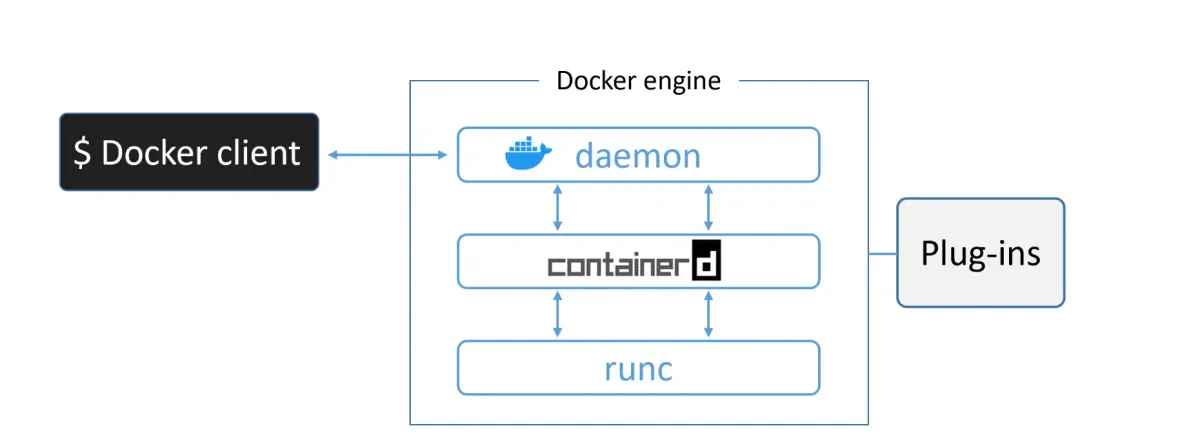
The Docker Engine is the core software that runs and manages containers. Think of it like ESXi for virtual machines—it’s the foundation everything else sits on.
The Docker Engine is modular by design, built from many small, specialized tools. Most of these are based on open standards maintained by the Open Container Initiative (OCI).
Key components:
- Docker daemon – Manages images, builds, APIs, orchestration
- containerd – Handles container lifecycle (start, stop, pause, rm)
- runc – Creates and runs containers
- Plugins – Networking, storage, logging
Together, these components work like a car engine — many small specialized parts creating something powerful and efficient.
Part 1: The Evolution — From Monolith to Modular
The Original Architecture (Early Docker)
When Docker was first released, it was simple but monolithic:
┌─────────────────────────────────┐│ Docker Daemon (monolith) ││ - Client ││ - API ││ - Runtime ││ - Image builds ││ - Much more │└────────────┬────────────────────┘ │ ▼ ┌────────────┐ │ LXC │ (Linux Container) └────────────┘ │ ▼┌────────────────────────┐│ Linux Kernel ││ - namespaces ││ - cgroups │└────────────────────────┘The Problem: LXC was:
- Linux-specific (Docker wanted to be multi-platform)
- An external dependency (risky for core functionality)
- A limitation on development velocity
The First Refactor: Replacing LXC with libcontainer
Docker, Inc. developed libcontainer as a platform-agnostic replacement for LXC. It provided access to kernel container primitives (namespaces, cgroups) without external dependencies.
This replaced LXC in Docker 0.9.
But the real problem remained: The daemon was still monolithic.
The Big Refactor: Breaking Apart the Monolith
Over time, the monolithic daemon became problematic:
- Hard to innovate — One huge codebase
- Slower — More code = more overhead
- Not what the ecosystem wanted — The industry was moving toward modularity
Docker, Inc. embarked on a massive refactoring effort following the Unix philosophy: build small specialized tools that can be pieced together.
The result: container execution and runtime code was entirely removed from the daemon and refactored into specialized tools.
Part 2: The Modern Docker Engine Architecture
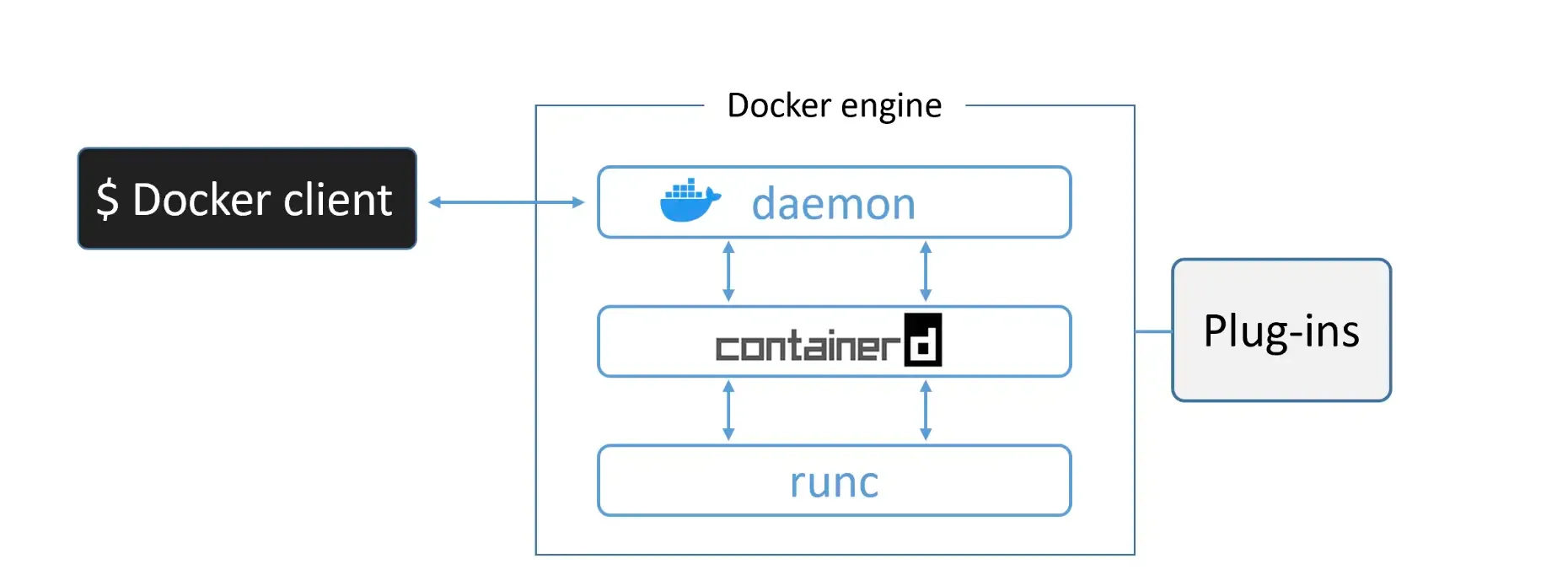
The current architecture consists of:
Docker Daemon (dockerd)
Remains in the daemon:
- Image management
- Image builds
- REST API
- Authentication & security
- Networking (core)
- Orchestration
Removed from the daemon:
- Container runtime code
- Container lifecycle management
- Low-level container creation
The daemon is now focused on higher-level operations, while lower-level operations are delegated to specialized tools.
containerd
Purpose: Manage container lifecycle operations (start, stop, pause, rm, etc.).
Originally designed to be lightweight and single-purpose, but has evolved to include:
- Image pulls and pushes
- Volume management
- Networking
- Storage plugins
Why it evolved: Projects like Kubernetes benefit from having these capabilities bundled together. But all extra functionality is modular and optional, so you can pick and choose what you need.
Key fact: containerd communicates with the daemon via gRPC (a high-performance RPC framework).
Status: Developed by Docker, Inc. and donated to the CNCF. Now a fully graduated CNCF project (stable and production-ready).
runc
Purpose: Create and run containers.
runc is the reference implementation of the OCI Container Runtime Specification. It’s essentially a lightweight CLI wrapper around libcontainer.
Key characteristics:
- Single, focused purpose: create containers
- Fast and efficient
- Bare-bones (no fancy features)
- Standalone tool (you can use it independently)
- Heavily used in the industry
When you create a container, containerd forks a new runc instance for each container. Once the container is created, the parent runc process exits—allowing you to run hundreds of containers without hundreds of runc processes.
Plugins
The Docker Engine also supports pluggable components:
- Networking plugins – Custom networking backends
- Storage plugins – Custom storage drivers
- Logging plugins – Custom log destinations
- Volume plugins – Custom volume management
Part 3: Creating a Container — End-to-End Flow
Let’s trace what happens when you run:
docker container run --name ctr1 -it alpine:latest shStep 1: Docker CLI to Docker Daemon
The Docker CLI converts your command into an API payload and POSTs it to the Docker daemon.
Where does it send it?
- On Linux:
/var/run/docker.sock(Unix socket) - On Windows:
\pipe\docker_engine(named pipe)
Step 2: Docker Daemon to containerd
The daemon receives the request but doesn’t contain any code to create containers.
Instead, it calls containerd via a gRPC API with the request.
Step 3: containerd to runc
containerd cannot actually create containers either. It’s a manager, not a creator.
It does three things:
- Converts the Docker image into an OCI bundle
- Calls runc with this bundle
- Monitors the container’s lifecycle
Step 4: runc Creates the Container
runc interfaces with the Linux kernel to assemble all the container constructs:
- Namespaces (PID, network, mount, etc.)
- cgroups (resource limits)
- Chroot/pivot_root (filesystem isolation)
runc then forks a process to start the container and immediately exits.
containerd │ ├─ forks runc │ └─ runc │ ├─ Creates namespaces, cgroups │ ├─ Starts container process │ └─ exits (parent of container becomes shim) │ └─ Container running (parent is shim, not runc)Step 5: The Shim Takes Over
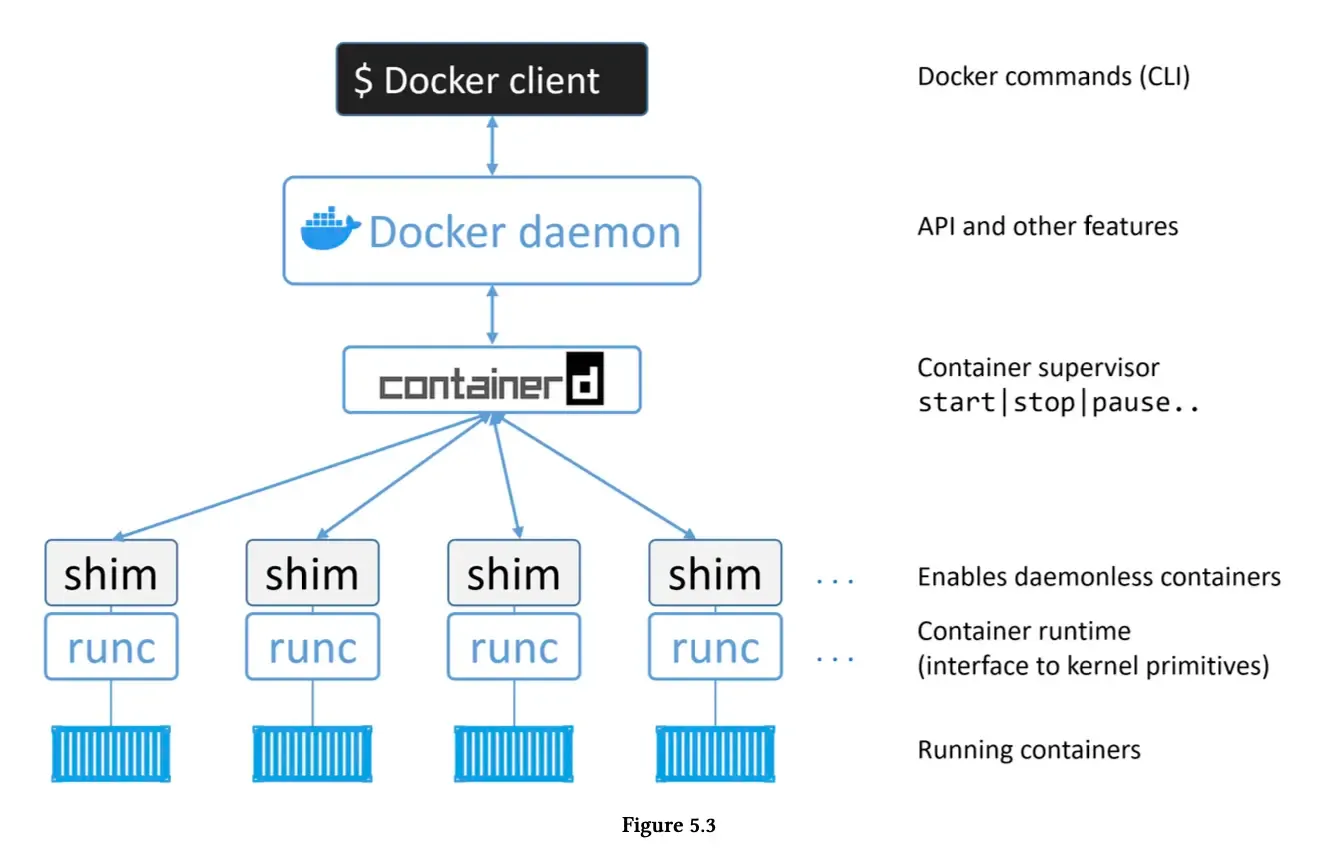
Once runc exits, the containerd-shim becomes the container’s parent process.
The shim’s responsibilities:
- Keeps STDIN/STDOUT streams open (so daemon restarts don’t kill the container)
- Reports exit status back to the daemon
- Acts as a bridge between the container and containerd
Visualization:
Part 4: The Genius of Daemonless Containers
Here’s why this architecture is brilliant:
The Old Problem
In early Docker, the daemon contained all runtime code. This meant:
- Starting/stopping the daemon = killing all containers on that host
- Every daemon upgrade = all containers die
- Production nightmare!
The New Solution: Daemonless Containers
By removing runtime code from the daemon and using containerd + runc + shim:
- The daemon can be restarted without killing containers
- You can upgrade Docker without downtime
- Containers are decoupled from the daemon
Old model:Daemon dies → All containers die (bad)
New model:Daemon dies → Containers keep running (good)Daemon restarts → Attaches to existing containersThis was a game-changer for production environments. It’s why Docker upgrades are no longer scary.
Note
The shim’s crucial role:
The shim is what makes daemonless containers possible. By becoming the container’s parent after runc exits, it:
- Keeps I/O streams alive during daemon restarts
- Manages the container’s lifecycle independently
- Reports status back when the daemon reconnects
Part 5: Binary Layout on Linux
On a Linux system, the Docker Engine consists of separate binaries:
/usr/bin/dockerd # Docker daemon/usr/bin/docker-containerd # containerd/usr/bin/docker-containerd-shim # Shim/usr/bin/docker-runc # runcYou can see these running with ps:
ps aux | grep dockerWhich ones are running depends on your containers:
- dockerd – Always running
- docker-containerd – Always running (daemon mode)
- docker-containerd-shim – One per running container
- docker-runc – Only briefly during container creation
Example with 2 running containers:
dockerd # 1 daemondocker-containerd # 1 managerdocker-containerd-shim # 2 shims (one per container)docker-containerd-shim #container process 1 # Your appcontainer process 2 # Your appPart 6: Data Flow — The Complete Picture
[Include your complete data flow diagram here]
Let’s understand the request journey:
Incoming Request
User: docker container run ... ↓Docker CLI ↓REST API payload ↓POST /var/run/docker.sockProcessing
Docker Daemon ├─ Validates request ├─ Checks authentication ├─ Manages image └─ Calls containerd via gRPC ↓ containerd ├─ Creates OCI bundle ├─ Forks runc │ └─ runc creates container └─ Starts shim as container parentContainer Running
containerd-shim (parent) ↓Container process (your app) ├─ PID namespace ├─ Network namespace ├─ Mount namespace └─ cgroup limitsContainer Output
Container process outputs ↓shim captures (STDIN/STDOUT) ↓containerd monitors ↓Daemon logs ↓Docker CLI / Docker APIPart 7: Why This Architecture Matters
Modularity
Each component has a single responsibility:
- runc – Create containers (does it really well)
- containerd – Manage lifecycle
- daemon – Higher-level orchestration
If you want to swap components:
- Use cri-o instead of containerd? Possible (with work)
- Use kata runtime instead of runc? Yes, it’s OCI-compliant
- Use containerd in Kubernetes? Yes, it’s a first-class runtime
Stability
Running containers are decoupled from the daemon:
- Daemon crashes? Containers keep running
- Daemon upgrades? No downtime
- Daemon restarts? Reconnects to running containers
Performance
Each tool is optimized for its job:
- runc is fast at container creation
- containerd is efficient at lifecycle management
- daemon focuses on orchestration
Open Standards
By following OCI standards:
- Docker images run on other runtimes
- Tools can be mixed and matched
- No vendor lock-in
Part 8: What’s Still in the Daemon?
You might wonder: with all that removed, what’s left?
At the time of writing:
Still in the daemon:
- Image management (pull, push, tag, rm)
- Image builds (docker build)
- REST API endpoints
- Authentication & security
- Core networking
- Orchestration (Swarm)
- Plugin management
Removed to other components:
- Container runtime (runc)
- Container lifecycle (containerd)
- Low-level I/O management (shim)
Over time, even more might be modularized. The daemon’s role is increasingly orchestration and higher-level logic.
Conclusion: Mastery Comes From Understanding
You can use Docker without knowing any of this. It just works.
But if you want learn how the system works, you need to understand:
- Why the architecture evolved — Monolith to modular
- How containers are created — The step-by-step flow
- What each component does — daemon, containerd, runc, shim
- Why daemonless containers matter — Production reliability
- How standards enable portability — OCI and the ecosystem