
Introduction: What authenticator apps really do
Authenticator apps (Google Authenticator, Microsoft Authenticator, Authy, etc.) are usually used as the second factor in MFA: after your password, you type a 6‑digit code from the app. Instead of getting that code over SMS, your phone generates it offline using the Time-based One-Time Password (TOTP) standard (RFC 6238).
Key properties:
- Codes are derived from a shared secret and the current time, not from any server call.
- The server knows the same secret, recomputes the same code, and compares.
- Codes expire quickly (typically every 30 seconds), shrinking the replay window.
1. Provisioning: getting a shared secret onto your device
Everything starts with a shared secret key (often called the seed). This is a random binary key (for example, 20 bytes) that both the server and your authenticator app must know.
1.1 Server generates the secret
When you click “Enable 2FA / Authenticator app” on a site:
- The server generates a random secret
K, usually 160 bits or more. - It encodes
Kinto Base32 to get a human/QR‑friendly string. - It builds an
otpauth://URI that encodes:- label (account name)
- issuer (service name)
- Base32 secret
- TOTP parameters: digits, period, algorithm
Example:
otpauth://totp/Example:alice@example.com?secret=JBSWY3DPEHPK3PXP&issuer=Example&period=30&digits=6&algorithm=SHA11.2 User scans QR code
The server encodes that URI as a QR code; your authenticator app scans it and:
- Parses the URI.
- Stores:
- the Base32 secret (decoded to raw bytes),
- label and issuer,
- TOTP settings (digits, period, algorithm).
From this point on, no network calls are needed to generate codes. Everything is local to the device.
2. The TOTP algorithm: time-based OTPs on top of HOTP
TOTP is essentially “HOTP with time instead of a counter.”
Conceptually:
TOTP(K) = HOTP(K, T)Where:
Kis the shared secret key.Tis a time counter derived from the current Unix time.
HOTP (HMAC-based One-Time Password) is defined as:
HOTP(K, C) = Truncate(HMAC-SHA-1(K, C))with C a counter. TOTP simply uses a time-based counter T instead of a monotonic counter C.
2.1 Computing the time counter T
Time is divided into fixed windows of length X seconds (usually 30):
T = floor((current_unix_time - T0) / X)Where:
X= time step (default 30 seconds).T0= epoch start (default 0).
With T0 = 0, X = 30:
- At Unix time 59s →
T = 1 - At Unix time 60s →
T = 2
Most authenticator apps simply do:
time_step = floor(now / 30)2.2 HMAC with secret + counter
Next, the app computes an HMAC over T:
HS = HMAC-SHA*(K, T)Where:
K= secret key bytes.T= 8‑byte big‑endian integer representing the time step.SHA*is usually:- SHA‑1 (default and most common),
- SHA‑256 or SHA‑512 for stronger variants.
For SHA‑1 you get a 20‑byte HMAC output, for SHA‑256 you get 32 bytes, etc.
2.3 Dynamic truncation and code derivation
From the HMAC output, we derive a short integer code using dynamic truncation (from HOTP):
-
Take the last byte of
HSand use its lower 4 bits as an offset:offset = HS[last_byte_index] & 0x0F -
Take 4 bytes starting at
offset:P = HS[offset..offset+3] -
Interpret
Pas a big‑endian 32‑bit integer and clear the sign bit:code_int = P & 0x7FFFFFFF -
Reduce modulo
10^dwheredis the number of digits (usually 6):OTP = code_int mod 10^d
For 6 digits:
OTP = code_int mod 10^6This gives a value from 0 to 999999; the app zero‑pads it to fixed length.
2.4 Parameters you’ll see in practice
These are commonly encoded in the otpauth:// URI:
digits:- Usually 6; sometimes 7 or 8.
period:- Usually 30 seconds; sometimes 60.
algorithm:SHA1(default and widely compatible)SHA256orSHA512for stricter setups.
These must match between app and server, otherwise codes won’t verify.
3. Verification: how the server checks your OTP
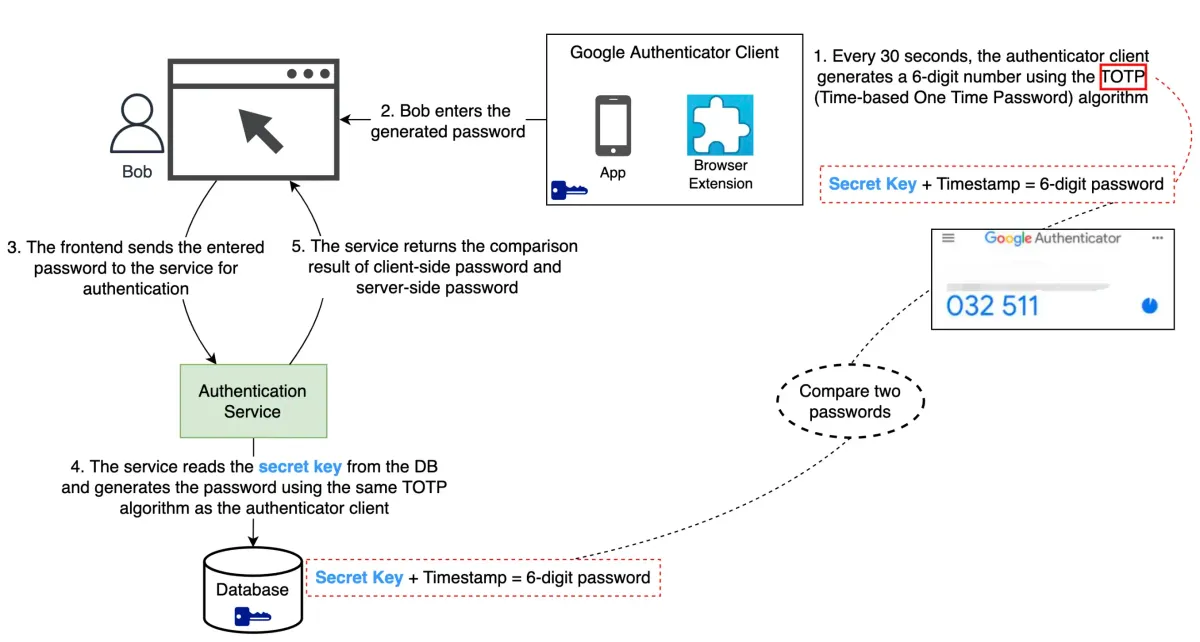
When you log in with TOTP enabled, the flow is:
- You enter username and password.
- The server verifies the password.
- The server prompts for an OTP from your app.
- You read the 6‑digit code and type it into the site.
- The server recomputes the expected TOTP and compares.
3.1 Server-side TOTP computation
On the backend, for user U:
- Look up the stored secret
K_U(usually encrypted at rest). - Compute
Tusing the server’s current time and configured step (for example, 30 seconds). - Compute TOTP using the same algorithm as the app.
Because clocks can drift and humans are slow, most implementations compute across a small time window, for example:
T(current time step)T - 1(previous step)T + 1(next step)
If the user’s code matches any of these, it’s accepted.
3.2 Handling clock skew
This verification window (±1 or more steps) is what hides small time drift: if your phone is off by ±20–30 seconds, you can still log in.
For large drift:
- Codes fail consistently.
- Some systems allow one‑time resync flows; others require time correction or re‑enrollment.
On the client side, many authenticator apps rely on OS‑level network time synchronization (NTP behind the scenes), so they rarely drift significantly.
4. Offline operation and system architecture
One critical property: authenticator apps work offline.
4.1 Client responsibilities
On the phone, the app:
- Stores the secret key securely (via secure enclave, keystore, or encrypted storage).
- Reads the current system time.
- Computes TOTP codes every period (e.g. every 30 seconds).
- Displays the current code and (optionally) a progress bar.
There is no network call to generate codes; it’s pure math on local time plus the secret.
4.2 Server responsibilities
On the server:
- Store per‑user secrets in a secure backend (for example, encrypted database column).
- Keep server clocks synced (typically via NTP).
- On login, recompute TOTP using:
- the same secret,
- the same time step,
- the same algorithm and digit length.
This architecture is highly scalable:
- The server doesn’t keep per‑login state (stateless check).
- No back‑and‑forth challenge is needed; the user just submits the code.
- Each login is “self‑contained” given user id and secret.
5. Security properties and attack surface
5.1 What TOTP protects against
Compared to SMS codes, TOTP:
- Is not tied to a phone number → resistant to SIM‑swap and SMS interception.
- Works offline → no telecom infrastructure in the critical path.
- Uses cryptographic HMAC over a secret key with short expiry → even if an attacker intercepts a code, it’s valid only for a tiny time window.
It’s strong second‑factor protection against:
- Password reuse attacks
- Credential stuffing
- Basic phishing (with caveats)
5.2 What TOTP does not solve
TOTP is not a silver bullet:
- Phishing / real-time relay: An attacker can capture your current TOTP via a fake site and immediately relay it to the real site. TOTP alone doesn’t bind the OTP to a specific origin.
- Secret key compromise: If malware steals your authenticator database or secret keys, an attacker can clone your factors.
- Time manipulation on client: If an attacker can change device time and has the secret, they can replay past or future codes.
This is why more modern factors like WebAuthn / passkeys add origin‑binding and more phishing resistance, but TOTP is still a huge upgrade over SMS.
6. Recovery codes and backup patterns
Because TOTP seeds live on a single device, losing that device usually means losing the secret.
6.1 Recovery codes
Most services offer recovery codes when you enable TOTP:
- Each is a long, random string that bypasses TOTP once.
- They’re one‑time use; after using one, you should regenerate the set.
- They must be stored like passwords (offline, secure, not in email or chat).
If you lose your authenticator app:
- You log in with username, password, and a recovery code.
- Then you re‑enroll a new authenticator device.
6.2 Device transfer
Most authenticator apps:
- Do not automatically sync secrets across devices (by design).
- Provide an export / import flow that re‑encodes your stored secrets into a migration QR code and transfers them to the new device.
This manual step trades convenience for security — automatic cloud backup of seeds would introduce a major central point of compromise.
7. Why authenticator apps beat SMS for MFA
From a system design perspective, TOTP authenticator apps are attractive because they:
- Decouple security from phone numbers (no SIM‑swap vector).
- Eliminate telecom dependencies (no SMS gateways, no SS7).
- Scale well (stateless verification, no per‑session state on the server).
- Work offline (no network dependency on the client side).
- Are standardized (RFC 6238, interoperable across apps and servers).
The main trade‑offs:
- Users must handle backup and recovery more carefully.
- Time drift can cause confusing failures for misconfigured devices.
- Phishing resistance is limited compared to hardware security keys or passkeys.
8. Summary: what’s really happening when you see that 6-digit code
When you open an authenticator app and see a 6‑digit code, under the hood the app is doing roughly this every 30 seconds:
- Read the current Unix time.
- Compute
time_step = floor(time / period)(for example, 30 seconds). - Pack
time_stepinto an 8‑byte big‑endian buffer. - Compute
HMAC(secret, time_step)using SHA‑1, SHA‑256, or SHA‑512. - Dynamically truncate 4 bytes from the HMAC result.
- Turn that into a 31‑bit integer and compute
mod 10^digits. - Display it zero‑padded as a fixed‑length code.
The server runs the same calculation with the same secret and time window. If your code matches within a small tolerance, you’re in.
It’s just math, time, and a shared secret — but implemented carefully, it gives you a robust, offline, standard second factor that significantly strengthens authentication.