
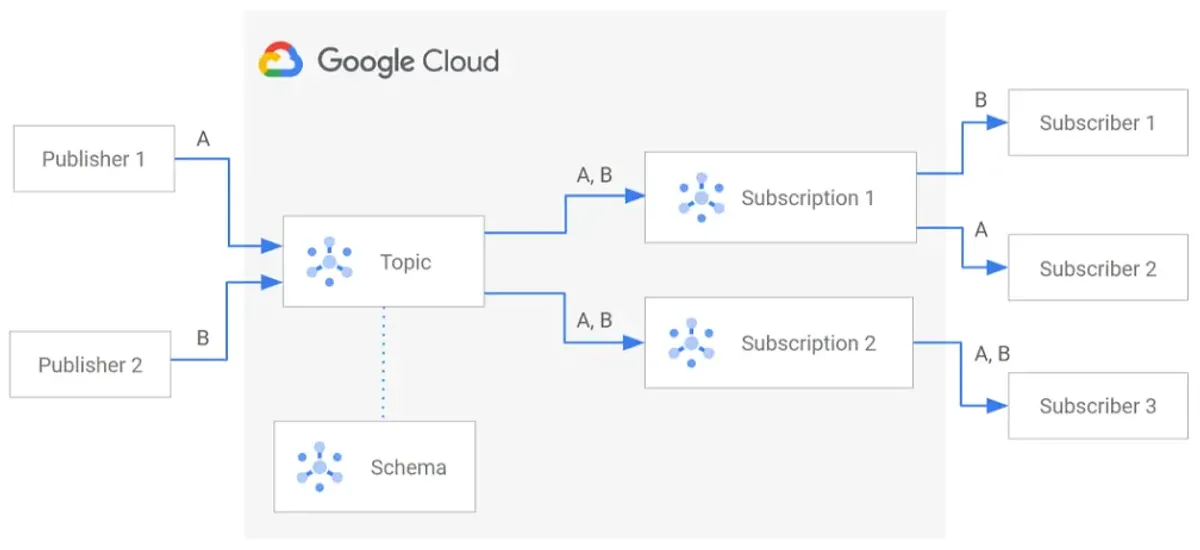
Why Bun + Pub/Sub?
Google Pub/Sub seems simple: create a topic, publish, subscribe, done.
In reality—especially when layering Bun, Docker, and multiple authentication methods—there are sharp edges that can burn a day or two of debugging.
This post is experience-driven. It covers what actually happens, not what the docs say should happen.
The Case for Bun + Pub/Sub
Bun works exceptionally well with the official Google Cloud Node.js SDKs:
- No hacks or polyfills needed
- Async/await support is clean
- Performs well under load
- Startup time is fast (important for serverless)
Use Bun + Pub/Sub when building:
- Log pipelines
- Background workers
- Event-driven microservices
- Internal tooling
- Message brokers
If you’re doing any of this in GCP, Bun + Pub/Sub is a solid, pragmatic choice.
Part 1: Installation
Add the Dependency
bun add @google-cloud/pubsubThat’s it. No Bun-specific adapters. No polyfills. The official SDK just works.
Package Structure
{ "dependencies": { "@google-cloud/pubsub": "^4.x.x" }}Version 4.x is stable and actively maintained. Use it.
Part 2: The Mental Model (Critical)
Before writing code, understand responsibility boundaries.
| Task | Your App? | Infra? |
|---|---|---|
| Create topics | ❌ No | ✅ Yes |
| Create subscriptions | ❌ No | ✅ Yes |
| Publish messages | ✅ Yes | ❌ No |
| Consume messages | ✅ Yes | ❌ No |
| Discover resources at runtime | ❌ No | ✅ Yes |
Golden Rule:
Runtime services should only publish and consume, never create or discover infrastructure.
This single rule avoids 90% of Pub/Sub pain.
Why This Matters
// Anti-patternawait pubsub.topic('logs').get({ autoCreate: true });This requires:
pubsub.topics.getpubsub.topics.create- Admin-level permissions
Your app shouldn’t need admin permissions.
// Correct patternconst topic = pubsub.topic('logs');// Publishing will fail clearly if topic doesn't existawait topic.publishMessage({ json: { ... } });If the topic doesn’t exist, publishing fails with a clear error. That’s intentional. Your infra team knows about it.
Note
The separation is a feature, not a limitation.
It forces your team to:
- Provision infrastructure upfront
- Separate concerns clearly
- Avoid runtime permission surprises
- Catch misconfiguration at deploy time, not 3am
Part 3: Basic Publisher (Bun)
Simple Publish
import { PubSub } from '@google-cloud/pubsub';
const pubsub = new PubSub({ projectId: process.env.GCP_PROJECT_ID,});
const topic = pubsub.topic(process.env.PUBSUB_TOPIC_NAME!);
// Publish a messageawait topic.publishMessage({ json: { message: 'hello world', timestamp: Date.now() },});
console.log('Message published');If this fails, it will fail clearly—assuming authentication is set up correctly.
Publish with Attributes
await topic.publishMessage({ json: { order_id: '12345', amount: 99.99 }, attributes: { priority: 'high', source: 'checkout', attempt: '1', },});Attributes are key-value pairs for filtering and routing downstream.
Batch Publishing
const messages = [];
for (let i = 0; i < 1000; i++) { messages.push({ json: { event: 'user_login', userId: `user_${i}` }, });}
await Promise.all( messages.map(msg => topic.publishMessage(msg)));Or let the client batch automatically:
const pubsub = new PubSub({ projectId: process.env.GCP_PROJECT_ID, batching: { maxMilliseconds: 100, maxBytes: 10 * 1024 * 1024, maxMessages: 100, },});The client waits up to 100ms, accumulates up to 100 messages or 10MB, then sends a batch.
Error Handling
try { await topic.publishMessage({ json: { data: 'important' } });} catch (error) { console.error('Failed to publish:', error.message);
// Implement backoff/retry logic // Or send to a dead-letter topic}Part 4: Basic Subscriber (Bun)
Consume Messages
import { PubSub } from '@google-cloud/pubsub';
const pubsub = new PubSub({ projectId: process.env.GCP_PROJECT_ID,});
const subscription = pubsub.subscription( process.env.PUBSUB_SUBSCRIPTION_NAME!);
// Listen for messagessubscription.on('message', (message) => { console.log('Received message:', message.data.toString()); console.log('Attributes:', message.attributes);
// Process the message // ...
// Acknowledge after processing message.ack();});
// Error handlingsubscription.on('error', (error) => { console.error('Subscription error:', error);});Acknowledge vs Nack
subscription.on('message', (message) => { try { // Process message const data = JSON.parse(message.data.toString()); processData(data);
// Success: acknowledge message.ack(); } catch (error) { // Failure: nack (message returns to queue) message.nack(); }});If you nack(), the message returns to Pub/Sub and will be retried (delivered again).
Graceful Shutdown
subscription.on('message', (message) => { // Process... message.ack();});
// When shutting downprocess.on('SIGTERM', async () => { console.log('Shutting down...'); subscription.close(); await pubsub.close();});Part 5: Authentication — The Three Methods
This is where most pain lives. Understand all three.
Method 1: Application Default Credentials (ADC) — Recommended
ADC is how Google Cloud wants you to authenticate. No secrets in code.
Local Setup:
gcloud auth application-default logingcloud config set project YOUR_PROJECT_IDThis creates:
~/.config/gcloud/application_default_credentials.jsonYour Bun app picks it up automatically:
const pubsub = new PubSub({ projectId: process.env.GCP_PROJECT_ID, // ADC is used automatically, no keyFilename needed});Advantages:
- No secrets in code
- Works locally and in production
- Easy credential rotation
- Same code everywhere
Disadvantages:
- Must configure locally (one-time)
- Docker requires special handling (more on that later)
Method 2: Service Account JSON File
Sometimes unavoidable (CI systems, legacy setups).
const pubsub = new PubSub({ projectId: 'my-project', keyFilename: '/path/to/service-account.json',});Advantages:
- Works in constrained environments
- Explicit about which SA is used
Disadvantages:
- Secrets on disk (rotation pain)
- Easy to commit to git
- Docker complexity increases
- Production risk (stale keys)
When to use: Only if ADC is impossible.
Method 3: ADC via Environment Variable
export GOOGLE_APPLICATION_CREDENTIALS=/path/to/sa.jsonStill ADC, but file-backed.
const pubsub = new PubSub({ projectId: process.env.GCP_PROJECT_ID, // Uses GOOGLE_APPLICATION_CREDENTIALS automatically});Good for: CI/CD, containers, when file path is dynamic.
Note
Recommendation:
- Locally: Use ADC with
gcloud auth application-default login - Docker: Mount ADC or use service account
- Production (Cloud Run/GKE): ADC is automatic, no action needed
- CI/CD: Use
GOOGLE_APPLICATION_CREDENTIALSwith a service account key
Avoid committing service account keys to git. Use secrets management (GitHub Secrets, GitLab CI Variables, etc.).
Part 6: IAM Permissions (Minimum)
Over-permissioning is the fastest way to hide bugs.
For Publishers Only
roles/pubsub.publisherThat’s it. Nothing else.
For Subscribers Only
roles/pubsub.subscriberFor Both
- roles/pubsub.publisher- roles/pubsub.subscriberWhat You DO NOT Need
roles/pubsub.admin # Way too muchroles/editor # Way too muchroles/owner # Way too muchpubsub.topics.get # Unless discovering at runtimepubsub.topics.create # Unless creating at runtimeAssign only what’s needed. If your app crashes due to missing permissions, that’s good—it means your config is under-scoped, which is safer than over-scoped.
Part 7: The Infamous Error: “undefined undefined: undefined”
You’ll see this error eventually:
Error: undefined undefined: undefinedIt’s cryptic. It’s useless. But it has a meaning.
What It Really Means
One of these:
- Missing IAM permission (often
pubsub.topics.get) - Calling
topic.exists()ortopic.get()with insufficient rights - Empty or undefined
GCP_PROJECT_ID - Empty or undefined topic name
- Topic doesn’t exist (and you’re trying to auto-create)
Why the Error Is So Bad
The Node.js gRPC client sometimes loses metadata during retries and surfaces this generic message. The actual error is swallowed.
How to Debug It
// Add loggingconsole.log('Project ID:', process.env.GCP_PROJECT_ID);console.log('Topic name:', process.env.PUBSUB_TOPIC_NAME);
try { const topic = pubsub.topic(process.env.PUBSUB_TOPIC_NAME!);
// Don't call exists() or get() — just publish await topic.publishMessage({ json: { test: true } });
console.log('Success');} catch (error) { console.error('Full error:', JSON.stringify(error, null, 2)); console.error('Message:', error.message); console.error('Code:', error.code);}The error codes matter:
PERMISSION_DENIED→ IAM issueNOT_FOUND→ Topic doesn’t existUNAUTHENTICATED→ Auth not set upINVALID_ARGUMENT→ Bad project ID or topic name
Part 8: Docker — Where Things Break
Docker introduces two critical differences.
Problem 1: ADC Is Not Automatically Available
Your host machine having ADC does NOT mean your container does.
This fails:
docker run my-appYour app can’t find the credentials.
Correct approach:
Mount the ADC credentials:
services: app: build: . volumes: - ~/.config/gcloud:/home/app/.config/gcloud:ro environment: HOME: /home/app GCP_PROJECT_ID: my-project PUBSUB_TOPIC_NAME: logsKey points:
- Mount to
/home/app/.config/gcloud(the app user’s home) - Set
HOME=/home/appso the client finds it - Use
:ro(read-only) for security
Problem 2: Non-root Users Matter
If your Dockerfile has:
USER appThen ADC must live under /home/app/.config/gcloud, not /root/.config/gcloud.
If you mount to /root and the container runs as user app, the client won’t find it—and will silently fail.
Complete Docker Compose Example (Correct)
version: '3.8'
services: pubsub-worker: build: context: . dockerfile: Dockerfile
volumes: # Mount your local ADC - ~/.config/gcloud:/home/app/.config/gcloud:ro
environment: # Critical HOME: /home/app
# Your config GCP_PROJECT_ID: my-gcp-project PUBSUB_TOPIC_NAME: user-events PUBSUB_SUBSCRIPTION_NAME: user-events-worker
# Optional: ensure container stops gracefully stop_signal: SIGTERM stop_grace_period: 10sComplete Dockerfile (Correct)
FROM oven/bun:1-alpine
WORKDIR /app
# Copy codeCOPY . .
# Install dependenciesRUN bun install --frozen-lockfile
# Create non-root userRUN addgroup -S app && adduser -S app -G appUSER app
# RunCMD ["bun", "run", "src/worker.ts"]Now when you run:
docker compose upYour container will:
- Mount your local ADC to
/home/app/.config/gcloud - Set
HOME=/home/appso the client finds it - Run as user
app(non-root) - Access Pub/Sub with your credentials
Part 9: The Most Common Mistake
This pattern is everywhere, and it’s wrong:
Don’t do this:
// Auto-creating topics at runtimeconst topic = await pubsub.topic('logs').get({ autoCreate: true});
await topic.publishMessage({ json: { message: 'hello' } });Why it’s wrong:
- Requires
pubsub.topics.createpermission (too much) - Hides infrastructure problems until production
- Creates unpredictable topics in other environments
- Your app shouldn’t know how to create topics
Do this instead:
const topic = pubsub.topic('logs');
// Just publish. If topic doesn't exist, publishing fails clearly.await topic.publishMessage({ json: { message: 'hello' } });If the topic doesn’t exist:
- Publishing fails with
NOT_FOUND - Your infra team gets alerted
- You fix the infrastructure
- Deploy again
This is the correct pattern.
Part 10: Docker Debugging Checklist
When Pub/Sub fails inside Docker:
-
Does
bun run test-pubsub.ts(make a small script just pushing to the topic) work on your host?- If no, your local setup is wrong. Fix it before Docker.
-
Is
GCP_PROJECT_IDactually defined inside the container?Terminal window docker compose exec pubsub-worker env | grep GCP_PROJECT_ID -
Is the topic name exactly correct?
Terminal window # Check if topic exists in GCPgcloud pubsub topics list -
Are you calling
exists(),get(), orautoCreate?- Don’t do this. Just use the topic object directly.
-
Does the runtime identity (service account) have the right IAM role?
Terminal window gcloud projects get-iam-policy YOUR_PROJECT \--flatten="bindings[].members" \--filter="bindings.members:serviceAccount:*" -
Is ADC mounted to the correct
HOMEpath?Terminal window docker compose exec pubsub-worker ls -la ~/.config/gcloud/
If #1 works locally and #4 is false, that’s usually the bug.
Part 11: Production (Cloud Run / GKE)
In managed GCP environments (Cloud Run, GKE, Compute Engine), everything simplifies.
Cloud Run
FROM oven/bun:1-alpineWORKDIR /appCOPY . .RUN bun install --frozen-lockfileCMD ["bun", "run", "src/worker.ts"]Deploy:
gcloud run deploy my-worker \ --source . \ --runtime nodejs18Assign IAM role:
gcloud run services add-iam-policy-binding my-worker \ --member=serviceAccount:my-service-account@my-project.iam.gserviceaccount.com \ --role=roles/pubsub.publisherYour Bun code doesn’t change:
const pubsub = new PubSub({ projectId: process.env.GCP_PROJECT_ID, // ADC is automatic in Cloud Run});Why it works:
- Cloud Run provides a service account automatically
- ADC works with that service account
- No secrets, no mounting, no complexity
GKE
Create a Kubernetes service account with Workload Identity:
gcloud iam service-accounts create my-bun-app
gcloud iam service-accounts add-iam-policy-binding \  my-bun-app@my-project.iam.gserviceaccount.com \  --role roles/pubsub.publisher
Link to your Kubernetes service account:
gcloud iam service-accounts add-iam-policy-binding \ my-bun-app@my-project.iam.gserviceaccount.com \ --role roles/iam.workloadIdentityUser \ --member "serviceAccount:my-project.svc.id.goog[default/my-bun-app]"Deploy:
apiVersion: v1kind: ServiceAccountmetadata: name: my-bun-app annotations: iam.gke.io/gcp-service-account: my-bun-app@my-project.iam.gserviceaccount.com---apiVersion: apps/v1kind: Deploymentmetadata: name: my-bun-appspec: replicas: 3 template: spec: serviceAccountName: my-bun-app containers: - name: worker image: my-app:latest env: - name: GCP_PROJECT_ID value: my-project - name: PUBSUB_TOPIC_NAME value: user-eventsAgain, your Bun code doesn’t change. ADC handles it.
Part 12: A Complete Example (End-to-End)
Publisher Service
import { PubSub } from '@google-cloud/pubsub';
const pubsub = new PubSub({ projectId: process.env.GCP_PROJECT_ID,});
const topic = pubsub.topic(process.env.PUBSUB_TOPIC_NAME!);
// Simulate eventssetInterval(async () => { const event = { userId: `user_${Math.floor(Math.random() * 1000)}`, action: ['login', 'logout', 'purchase'][Math.floor(Math.random() * 3)], timestamp: Date.now(), };
try { await topic.publishMessage({ json: event, attributes: { source: 'user-service', version: '1.0', }, }); console.log(`Published: ${event.action}`); } catch (error) { console.error('Failed to publish:', error.message); }}, 5000);Subscriber Service
import { PubSub } from '@google-cloud/pubsub';
const pubsub = new PubSub({ projectId: process.env.GCP_PROJECT_ID,});
const subscription = pubsub.subscription( process.env.PUBSUB_SUBSCRIPTION_NAME!);
subscription.on('message', (message) => { try { const event = JSON.parse(message.data.toString());
console.log(`Received: ${event.action} from ${event.userId}`);
// Process the event (e.g., update database) // ...
message.ack(); } catch (error) { console.error('Failed to process message:', error.message); message.nack(); }});
subscription.on('error', (error) => { console.error('Subscription error:', error);});
process.on('SIGTERM', async () => { console.log('Shutting down...'); subscription.close(); await pubsub.close();});Docker Compose
version: '3.8'
services: publisher: build: . volumes: - ~/.config/gcloud:/home/app/.config/gcloud:ro environment: HOME: /home/app GCP_PROJECT_ID: my-project PUBSUB_TOPIC_NAME: user-events command: bun run src/publisher.ts
subscriber: build: . volumes: - ~/.config/gcloud:/home/app/.config/gcloud:ro environment: HOME: /home/app GCP_PROJECT_ID: my-project PUBSUB_SUBSCRIPTION_NAME: user-events-worker command: bun run src/subscriber.tsRun locally:
docker compose upPart 13: Troubleshooting Guide
| Error | Cause | Fix |
|---|---|---|
undefined undefined: undefined | Missing IAM, bad project ID, or topic doesn’t exist | Check IAM roles and environment variables |
PERMISSION_DENIED | Service account lacks permissions | Grant roles/pubsub.publisher or roles/pubsub.subscriber |
NOT_FOUND | Topic or subscription doesn’t exist | Create infrastructure via gcloud or console |
UNAUTHENTICATED | ADC not found or credentials expired | Run gcloud auth application-default login |
The specified credentials were not found | Wrong HOME path in Docker | Mount ADC and set HOME correctly |
Operation timed out | Network or quota issue | Check VPC, firewall, quotas |
Conclusion: Keep It Simple
Pub/Sub itself is solid. Most pain comes from:
- Mixing responsibilities — Apps shouldn’t create infrastructure
- Over-permissioning — Give only what’s needed
- Misunderstanding ADC — Especially in Docker
- Calling
exists()orget()at runtime — Just use the topic/subscription object
Once you embrace these patterns, Pub/Sub becomes boring—in the best way.
Your checklist:
- Only publish and consume at runtime
- Provision topics/subscriptions upfront
- Use ADC locally
- Mount ADC in Docker
- ADC is automatic in Cloud Run/GKE
- Assign minimal IAM roles
- Log environment variables when debugging
If your Pub/Sub setup feels fragile, it’s usually a design issue, not a tooling issue.
Happy shipping 🚀