
The Problem: How Do We Connect Multiple Video Streams?
Imagine you’re building a video conference app. Two people need to see and hear each other.
Easy: Direct connection. No server needed.
Now add 10 more people. Now 100. Now 1000.
Hard: How do you route video streams between all of them efficiently?
This is where WebRTC architectures come in. Different designs solve this problem in different ways, each with trade-offs.
Part 1: The Simplest Solution — Peer-to-Peer (P2P)
Direct Connection Between Two Peers
In WebRTC, a peer is simply a user. When two peers communicate directly, they establish a connection without any server in between.
User A ←→ User B(WebRTC over UDP)How it works:
- User A and User B exchange SDP (Session Description Protocol) offers
- WebRTC establishes a direct UDP connection
- Video/audio streams flow directly between them
- No server, no latency from routing through infrastructure
Advantages:
- Minimal latency (direct connection)
- No server cost
- Privacy (data doesn’t pass through third parties)
- Simple to implement
Disadvantages:
- Only works for 2 people
- Not scalable
- Requires NAT traversal (STUN/TURN servers, but not for relaying)
Note
WebRTC Basics: WebRTC uses UDP instead of TCP because video calls prioritize speed over reliability. A dropped frame is acceptable; retransmitting it would increase latency. UDP is connectionless, fast, and perfect for real-time communication.
Part 2: Adding More Peers — The Mesh Problem
What Happens When a 3rd Peer Joins?
Now User C wants to join the call. User C needs to connect with both User A and User B.
User A / \ / \User B -- User CEach peer sends its stream to every other peer. This is called mesh P2P architecture.
The Mesh Topology
In a mesh network:
- Every peer connects to every other peer
- Each peer sends its stream N-1 times (where N = total peers)
- Each peer receives N-1 streams
4 peers = 6 connections:
User A ↔ User BUser A ↔ User CUser A ↔ User DUser B ↔ User CUser B ↔ User DUser C ↔ User DMathematical formula: For N peers, connections = N × (N-1) / 2
2 peers: 1 connection3 peers: 3 connections4 peers: 6 connections5 peers: 10 connections10 peers: 45 connections20 peers: 190 connectionsWhy Mesh Fails
1. Bandwidth explosion:
Each peer must upload its stream to N-1 peers. If each stream is 2 Mbps:
10 peers: Each peer uploads 2 × 9 = 18 Mbps20 peers: Each peer uploads 2 × 19 = 38 MbpsYour home internet might not support this.
2. CPU intensive:
Encoding multiple streams simultaneously is CPU-heavy. Your laptop’s processor maxes out.
3. Not fault-tolerant:
If one peer drops, the connection graph breaks. You need to reconnect everyone.
4. Terrible for mobile:
Battery drain from continuous upload. Data usage is astronomical.
Solution: We need a server to centralize connections.
Note
Mesh is only practical for very small groups (2-4 people). Anything larger needs a central server. This is why P2P video calls are limited to 1-on-1; group calls need infrastructure.
Part 3: Introducing a Server — MCU (Multipoint Control Unit)
Centralized Mixing
Instead of mesh, introduce a server in the middle:
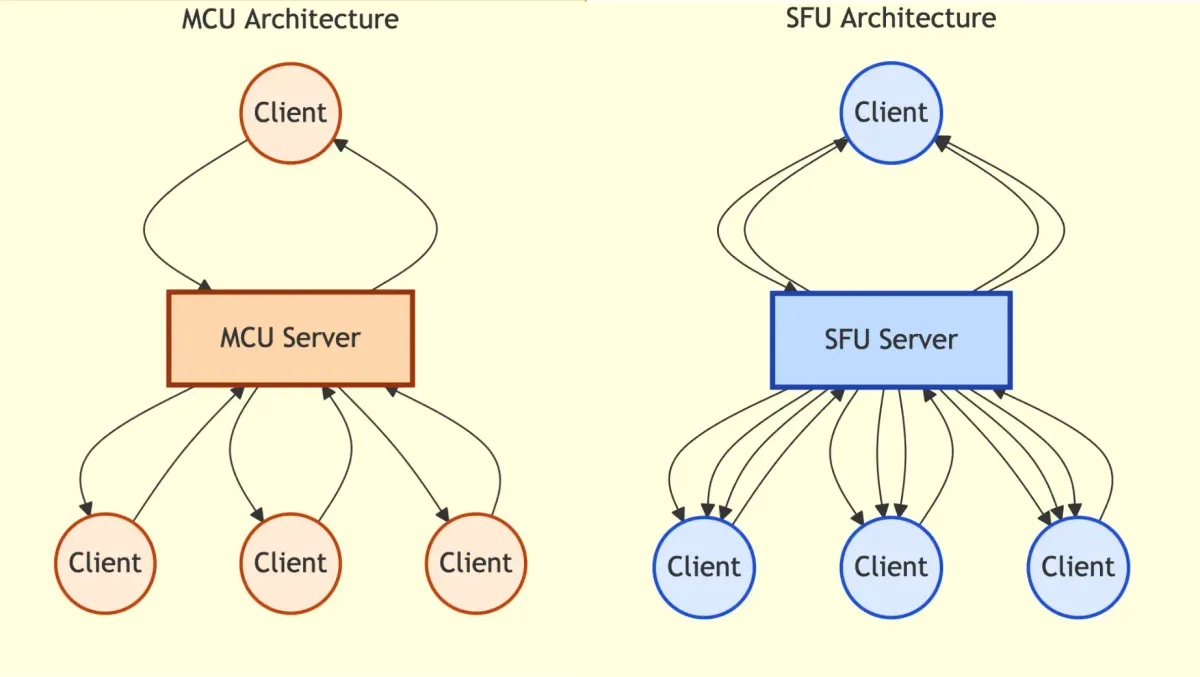
User A \User B → MCU Server → [Mixed Stream] → All UsersUser C /The MCU (Multipoint Control Unit) is a server that:
- Receives streams from all peers
- Mixes them into a single video (like a video grid)
- Broadcasts the mixed stream to all peers
How MCU Works
Imagine a grid of 4 video tiles:
[User A] [User B][User C] [User D]The MCU:
- Receives raw streams from User A, B, C, D
- Resizes and arranges them into a grid
- Composes them into a single video output
- Encodes and sends the same video to all users
Advantages of MCU
- Bandwidth efficient (each peer uploads once, downloads once)
- Scalable (server handles mixing)
- Simple for clients (receive one stream, display it)
Disadvantages of MCU
- CPU intensive: Real-time video mixing/compositing is expensive
- High latency: Processing multiple streams, composing, encoding = delays. Lag is noticeable
- Expensive to run: Server costs scale with processing power
- Inflexible: Fixed layout. If one user goes fullscreen, everyone sees the same stream. You can’t show different content to different users
- Quality loss: Compositing often reduces quality to save CPU
Real example: Old WebEx systems used MCU. Noticeable lag and visual artifacts.
Note
The Compositing Problem: Combining multiple video streams in real-time is non-trivial:
- Resize each stream to fit the grid
- Blend them together
- Re-encode the output
- All in under 33ms (for 30fps video)
This is why MCU requires powerful servers.
Part 4: The Better Approach — SFU (Selective Forwarding Unit)
No Mixing, Just Forwarding
SFU is an evolution of MCU that solves the mixing problem by… not mixing at all.
User A → \User B → → SFU Server → [Stream A, Stream B, Stream C, Stream D] → All UsersUser C → /The SFU (Selective Forwarding Unit):
- Receives streams from all peers (like MCU)
- Does NOT mix them (unlike MCU)
- Forwards raw streams to all peers
- Lets the client decide how to render
How SFU Works
Instead of sending a single mixed video:
SFU → User A: [Stream B, Stream C, Stream D]SFU → User B: [Stream A, Stream C, Stream D]SFU → User C: [Stream A, Stream B, Stream D]SFU → User D: [Stream A, Stream B, Stream C]Each peer receives raw video streams from every other peer and arranges them client-side.
The client decides:
- How to layout the grid
- Which video to highlight
- Which streams to mute
- Which stream to display fullscreen
Advantages of SFU
1. Low latency: No mixing = minimal processing. Just forward streams. Latency is much lower than MCU.
2. Flexible rendering: Each user sees what they choose. User A can fullscreen User B while User C sees everyone in grid mode.
User A's screen: [User B fullscreen]User C's screen: [Grid: A, B, C, D]Different clients, different layouts3. Easy to mute: Want to stop seeing User B? Client simply stops downloading their stream.
4. Scalable: Server doesn’t do heavy processing. It’s basically a smart router. More CPU = more users.
5. Efficient bandwidth: Each peer uploads once. Downloads scale with group size, but that’s the same for all architectures. Benefit: only download what you need.
Disadvantages of SFU
- More bandwidth for clients: Each client receives multiple streams (one per peer). Download = N-1 streams
- Client-side processing: Decoding and rendering multiple streams uses CPU on your device
- Network congestion: If a peer has poor upload, it affects everyone (they receive a poor-quality stream)
Trade-off: SFU moves work from server to clients. Servers are more powerful, but clients distribute the load.
Part 5: Comparing the Three Architectures
| Aspect | Mesh P2P | MCU | SFU |
|---|---|---|---|
| Connections per peer | N-1 | 1 | 1 |
| Bandwidth per peer | High | Low | Medium-High |
| Server processing | None | Very High | Low |
| Latency | Lowest | Highest | Low |
| Scalability | Poor | Medium | High |
| Flexibility | High | Low | High |
| Cost | Low | High | Medium |
| Best for | 1-1 calls | Small groups with fixed layout | Large groups |
Part 6: Real-World Examples
Zoom
Zoom primarily uses SFU architecture.
Why?
- Handles 1000+ participants (scalable)
- Low latency (you can see people react in real-time)
- Flexible UI (you choose gallery view, spotlight, fullscreen)
- Server is a router, not a processor
When you’re in a 100-person Zoom call, the server isn’t composing a 100-person grid. It’s forwarding 100 separate video streams.
Google Meet
Google Meet uses SFU with some hybrid elements.
- Large meetings: SFU (everyone receives multiple streams)
- For display, sometimes uses client-side layout (no MCU mixing)
Teams/Skype
Microsoft uses SFU for most calls, with MCU for specific scenarios (like recording entire meeting as one video).
Discord/Telegram
Small group calls: SFU (Discord supports up to 25 people on video)
Why not larger? Because receiving 25 streams stresses home internet.
Part 7: When Do You Use Each?
Use Mesh P2P When:
- Only 2 people (1-on-1 calls)
- Privacy is critical (no server involvement)
- Low latency is essential
- You have good internet
Example: Secure peer-to-peer chat apps, some P2P game networking.
Use MCU When:
- Small group (3-10 people)
- Fixed layout is acceptable
- You want to save client bandwidth
- Recording the entire call as one video
Example: Traditional conference systems, old WebEx/Polycom.
Use SFU When:
- Large groups (10+ people)
- Flexible UI is important
- Low latency is critical
- Scalability matters
Example: Zoom, Google Meet, modern conferencing platforms.
Part 8: The Client Rendering Problem
In SFU, clients receive multiple streams. Now the client must:
- Decode each stream (video codec, like VP8 or H264)
- Resize each stream to fit the grid
- Compose them into a canvas
- Render at 30fps
This is CPU-intensive. Here’s why Zoom on a laptop can get hot:
10 participants × 30fps × decoding overhead = High CPU usageOptimization: Clients often:
- Reduce resolution of non-focal streams (you don’t need 4K for a small tile)
- Pause decoding of streams you’re not looking at
- Use hardware acceleration (GPU) for video decoding
Part 9: Conclusion: Architecture Affects Everything
The architecture you choose isn’t just technical. It affects:
- Latency: How fast do users see reactions?
- Scalability: How many people can join?
- Cost: How much does the server cost?
- Quality: What resolution and framerate?
- User Experience: Can I mute someone? Go fullscreen? Control my view?
The trend: Modern platforms use SFU because:
- Scales better than MCU
- Lower latency than MCU
- Better UX than P2P
- Cost-effective